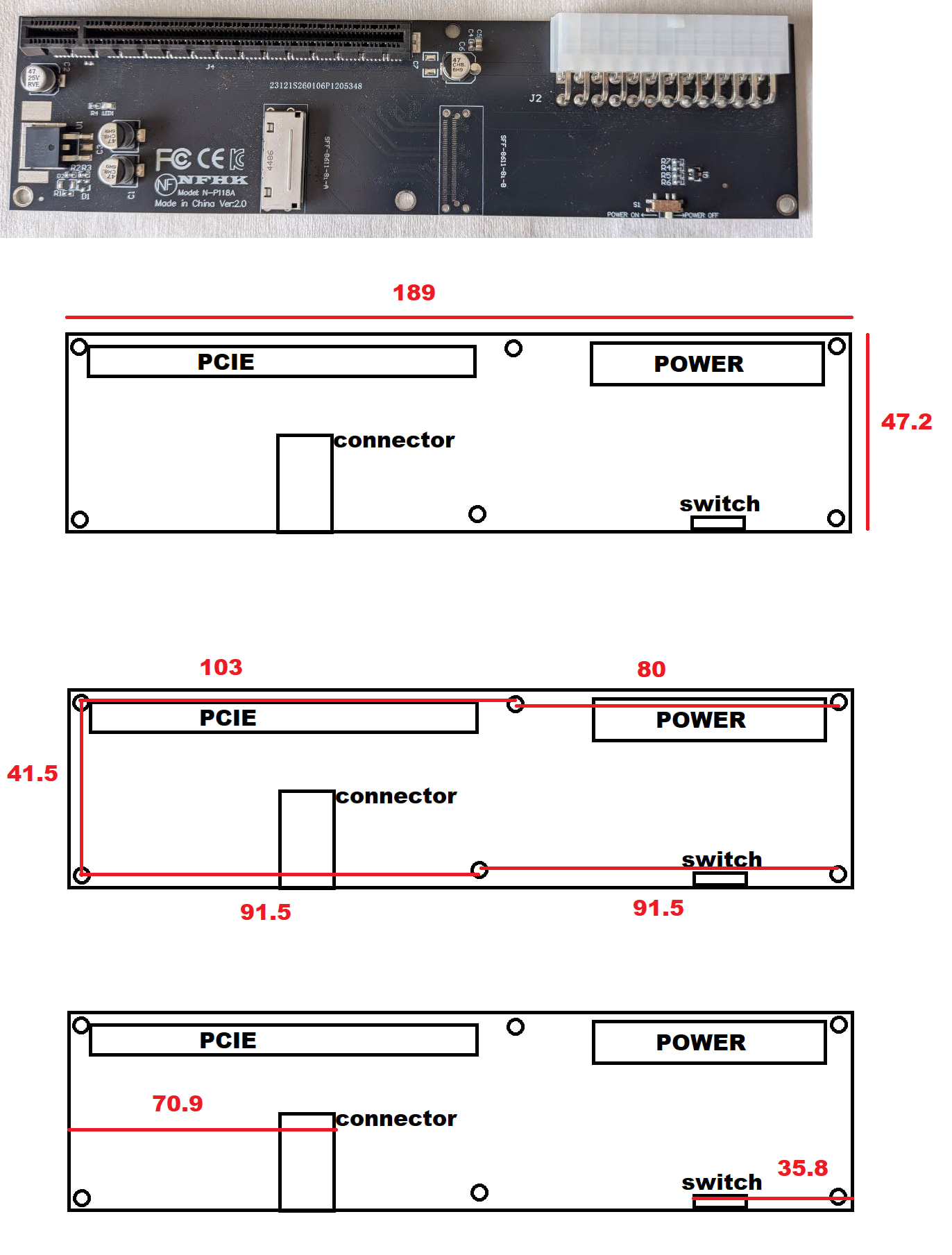
I just noticed… There’s another variation on this eGPU board; the picture from the Amazon listing has a few differences from my board, and is notably model “N-P118-A” while I received model “N-P118A” (no second hyphen). Not sure what the extra pads and resistors are for – but it might be worth noting this if folks end up seeing different results when testing similar GPU/FW16 models.
Of course they would. Because why wouldn’t they? Ok so don’t judge, I did a quick mock up and here is what I got after redoing each measurement. This is absolutely not my specialty, but I hope it does justice to what you’re looking for. This is the “NFHK Model: N-P118A Made in China Ver:2.0”
That is indeed a bit difficult to move. RX2 would still be possible, but RX5 would get way too near the reference clock traces, so I opted for the current routing.
Yes, via-in-pad is possible and doesn’t add that much to the overall cost, but the pads are so close that I would have issues with clearance constraints from JLC with vias being too close and would then need to also choose smaller via hole size and that by itself doubles the price of the boards.
But there’s also the issue of the solder pads for the SMD nut for the interposer connector on the bottom of the board, so you cannot really place vias on the PCIe lane pads where that is. I did also check the M.2 expansion bay board and Framework doesn’t seem to use via-in-pad either. They just seem to use smaller vias from what I could see.
This is great! It looks like they didn’t move the position of the screw above the PCI-e slot in your photo, so I brought my measurement of that into the current version of the 2.0 jig model.
I’d really like someone with the v2.0 eGPU and access to a 3D Printer to give the new jig a test-fit so we can verify accuracy, both for pegs and the PCI-e slot. I’ve added little nibs to the side of the jig that minimize using extra filament while “pointing” at where the ends of the PCI-e slot are currently expected to be. Just sent a v1.0 of the same to my printer to check my measurements of the same.
Sorry, was a really busy day at work for me did not have a chance to get back to you. I can certainly see if my coworker will do another print for me and test it.
Nice! And no worries. I just had some free time this morning to throw at it. Gonna be a few days before I can tackle more anyway. The good news is, if our measurements align as they seem to, we should be able to have one mount with 9 mounting points, of which either eGPU version just uses 6.
Now that would be slick. Here’s to hoping my measurements are accurate based on my ruler . Just got confirmation they can print for me. So when I get it I can let you know if it fits.
For the 3D printing fans without a 3D printer, check your local library. Two of my local libraries have makerspaces with 3D printing. Sure, not as convenient as a printer in-house, but the library gives everybody a small credit every month so you can print some stuff for free. A little off topic, but they also have sewing machines, embroidery machines, sublimation printing, large format full color printing (I think 30” across and prints on rolls for posters or even long banners), engravers, and more.
And @Filip, I’d be happy to trade you one of my adapters for one of yours!
So the limit I set on the form has been just reached. I set a limit as I ordered a specific amount of OCuLink connectors to JLCPCB a few weeks ago and we’re extremely near the amount of boards that I can get produced. I’m still waiting on the connectors to arrive… which should hopefully be by next week.
I did just order another batch of connectors, so if these arrive on time when I order the big batch of boards, I’ll order with all of them and open the form again.
In other news, the “final” revision of the board that might fix it for @Overheat is just finishing assembly, so I should have it sometime next week. If all goes well on his end afterwards, I’ll be doing that big batch and while cutting it close, I should be able to get the boards tested and shipped out.
@Andrew_Shaffer sorry for the delay, my co-worker’s printer was down. Sounds like it is back up now. But they said the file I got from your link for the v.2 was a 3d model and not an stl file? I don’t work with that stuff personally. Is there somewhere else you have an stl file?
Ah! Sorry, I’m used to working with .3mf files (they’re a newer format that includes info like units/etc). I’ve uploaded .stl files as well since it sounds like your coworker is using a slicer that prefers .stl files.
Yeah sorry guys, it’s not my printer I’ve never used one. Maybe hers isn’t capable or she just doesn’t know how. She’s just trying to do me a favor. I’ll see if I can snag the stl and go from there.
I have the v2.0 board (N-P118A) and a 3d printer, if you want I can print and test it if it’s under 256mm lenght.
about the measures, I’ve checked with a caliber.


 . Just got confirmation they can print for me. So when I get it I can let you know if it fits.