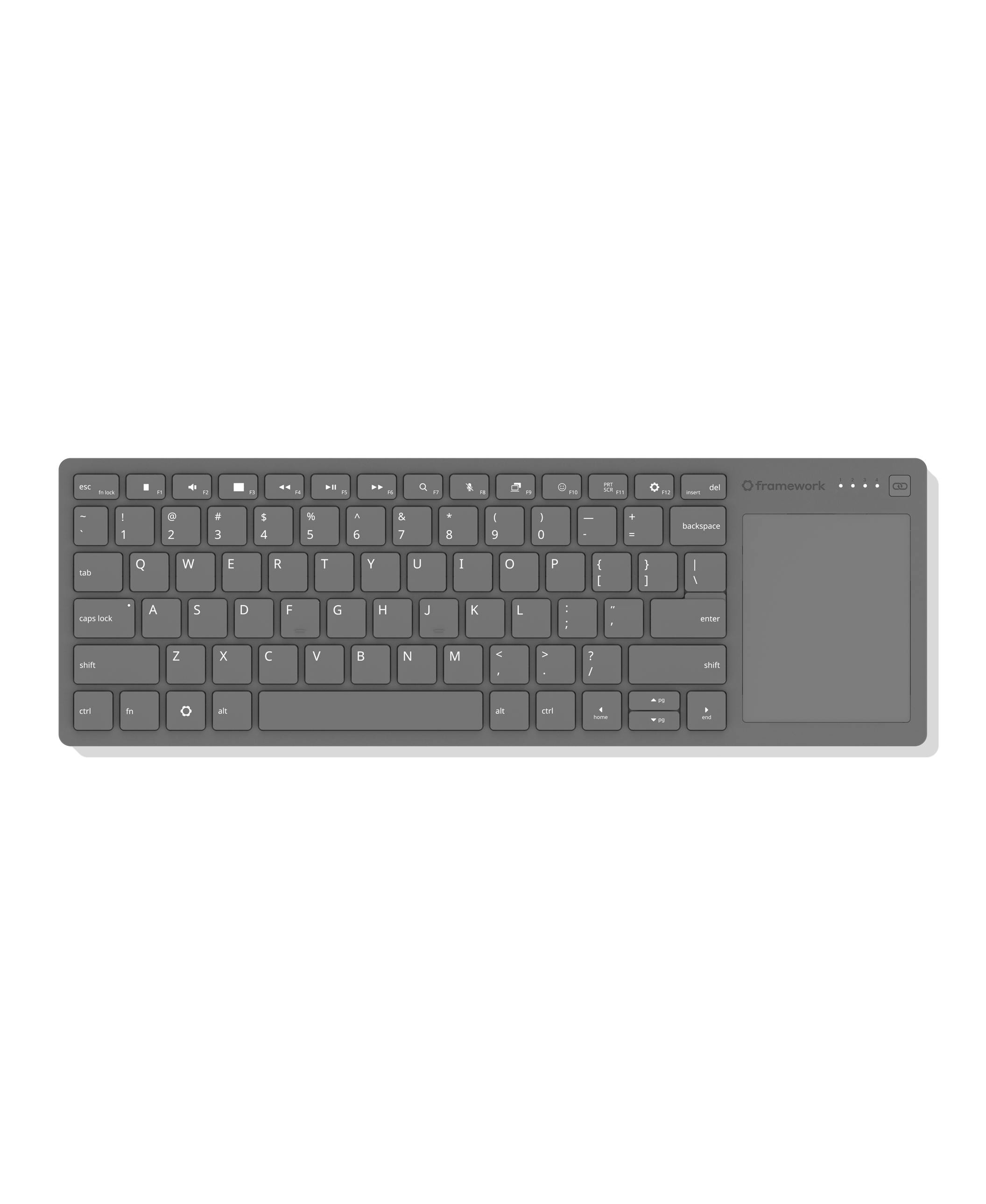
We’re excited to preview the Framework Wireless Touchpad Keyboard, a compact keyboard with integrated touchpad that is excellent for living room use, setting up computers, and mounting into sim rigs. As we were developing Framework Desktop and using it in these scenarios, we found that there was just one popular keyboard in this segment, and it was one that neither we nor the broader community particularly liked. We knew we could do better, and so we did! Our keyboard uses the same great-feeling mechanical key structure and touchpad architecture that we put in Framework Laptop 12. A highly power-efficient Nordic nRF54 radio and open source ZMK Firmware enable pairing four BLE and USB-A Dongle hosts along with wired USB-C connectivity. In addition to the dongle, which is storable in the back of the keyboard, we’re developing a USB-A Adapter Expansion Card that allows it to sit flush in a Framework Laptop or Desktop.
We partnered with Lite-On for this keyboard, the same manufacturer we’ve worked with now on the keyboards and touchpads we’ve shipped in every version of Framework Laptop over the last 5 years. The overall design is slim while still being rigid, and the bottom cover is translucent black, giving you a view of the internal structure and electronics. The keyboard has 1.5mm key travel and full 19mm key spacing just like our laptops. The 68.8mm x 85.6mm touchpad is a clickable Windows Precision Touchpad, meaning it supports multi-finger gestures on both Windows and Linux.
On top of this being an easy to use, convenient keyboard, we brought the Framework product philosophy throughout. We’ve released open source surface CAD to enable development of 3D-printable mounts and accessories, which is ideal for the sim rig use case. As with all of our products, the rechargeable battery is easy to replace and will be available in the Marketplace. Finally, the Control Board that contains the core electronics is a module that we’re making available separately in the Framework Marketplace to enable makers to use it as a base for their own wireless keyboard designs. We exposed 28 I/O pins from the nRF54LM20A microcontroller to allow a wide range of key matrix options.
We’re sharing this preview of Framework Wireless Touchpad Keyboard to give developers an early start on building around it. To grow the ecosystem faster, we’re also kicking off an initiative to provide Control Boards free to developers. You can apply to join through this form. The Framework Wireless Touchpad Keyboard will be available later this year, and we’ll keep you up to date as we complete development and manufacturing of it.
It looks great! Will there be a left-handed version available too?
I’d also personally be interested in (and eager to try making) a more compact version that is suitable for use in, for example, a cyberdeck. I’ve applied to the developer application form for that, since it’s of course a much more niche use case that presumably won’t be officially offered by Framework directly.
This looks like a great option; I too dislike the Logitech combo but can’t find a reliable replacement.
I was really hoping for a wireless chassis on which to use Framework 16 input modules. Part of sustainability is reusing what you have, and you have a great input deck ecosystem waiting to break free. The FW 16 keyboard plus a new mid-sized haptic touchpad module would have been awesome, especially since that could be used on the FW16 (with a lower half blanking piece, or some type of ePaper display since the I2C pins for the touchpad would be free).
Are the keys backlit? That would be super useful in a dim living room…
I can’t help but feel that it’s a bit of an L that the decision was made to recycle the FW12’s keyboard as opposed to going with the FW16’s modular input module design, as that would enable the keyboard to be hot-swapped by the user themselves, as well as being able to use the touchpad space for something else should the user desire.
I had looked at building something similar with the FW12 input cover + a spare bottom cover, but glad to see I can just get this keyboard or use the Control Board instead
Question about differences with the full keyboard and FW12 input cover connectivity between keyboard, trackpad and the Control Board:
The FW12 input cover has separate touchpad and keyboard controllers on the touchpad circuit board that then get routed back to the mainboard as I2C HID. Does this Control Board replace both controllers present on the input cover or are those still present?
I too use the infamous Logitech combo for my living room setup. I may be the minority, but one thing I do like about it is that there is a mouse click button on the left side. That makes it easy to navigate with your right hand using the trackpad, and click with your left hand at the same time.
This keyboard combo doesn’t seem to have that, so I’d be interested to see how easy navigation is when using it on your lap or propped up on a pillow or something.
Finally, a new HTPC keyboard! Love to see it! I’ve been babying my Microsoft All-in-One Media Keyboard for ages now, terrified at the prospect of it breaking somehow and having to downgrade to the K400. Really glad to see you all take this up.
Some considerations from an HTPC user:
A lot of us love these keyboards for the additional click button on the opposite end of the keyboard. This makes it easy to track with your right thumb and click with your left, increasing precision with a two-hand holding position. It’s a bit of a bummer to see that omitted.
Dedicated volume and mute buttons are also very convenient for boards like these, as they’re much easier to find and press as opposed to getting potentially confused amongst the row of equally sized and shaped function keys. Personally, I’ve grown very attached to them on the Microsoft All-in-One.
There’s a lot of people who view backlit keys as a must-have on these keyboards. These folks are mostly stuck to either the discontinued Logitech K830 or some cheaper (and inferior) brand products on Amazon.
If not for this release, I would love to see these features considered for a future one. Either way, I am excited to have a modern trackpad on an HTPC keyboard like this!
I would so get this if it had a backlight! I am desperate to replace my janky Logitech dinosaur media keyboards, but I really need one with a light in it since I use it in my movie theatre set up with the lights off.
You should be able to assign any key to do most anything you wish, including mouse clicks. They list the Framework wireless keyboard as running ZMK open source firmware, zmk.dev. ZMK should allow full configuration of most everything. And there are methods to have keys serve multiple functions as well. But even just thinking simple single-function key remapping, how many people regularly even use their CapsLock key? I use mine for Alt-tab type window switching.
Now Framework hasn’t yet discussed how easy configuration will be. But one way or another, it should be possible.
I assume the Framework wireless control board will not be a drop-in replacement, as-is. You very likely would need to modify the firmware yourself to support other keyboards. Not sure about supporting the FWL12 touchpad. It may not be easy, or practical for most people to do.
Sadly the FWL16 input modules aren’t suitable for wireless use. Each input module has an on-board RP2040 mcu as their keyboard controller, and QMK firmware. Neither mcu nor firmware is made for low power use, at all. You really must use an mcu and firmware designed from the ground up for power-sipping battery use, or else you can have such absolutely atrocious battery life that no one would put up with it.
Could you share the dimensions of the Control Board? Perhaps even a picture or technical drawing, so we could see connector locations.
It’s probably a long shot for it to fit, but I have a relatively large mouse which I converted to QMK via a rp2040 adapter board I made a few years ago. I had the urge to go wireless, but at the time, ZMK wasn’t there yet for mouse use for me.
I admit I was a little disappointed it wasn’t a portable keyboard that used the same framework 16 keyboard modules, therefore allowing us to swap to any of the existing keyboards we like. But it at least has a replaceable battery and looks good.
While I understand one of the left buttons can be remapped to simulate a mouse click, it seems like a missed opportunity. If this keyboard is intended to be a superior version of its main competitor, the lack of a dedicated mouse click button is a significant oversight.



 I use mine for Alt-tab type window switching.