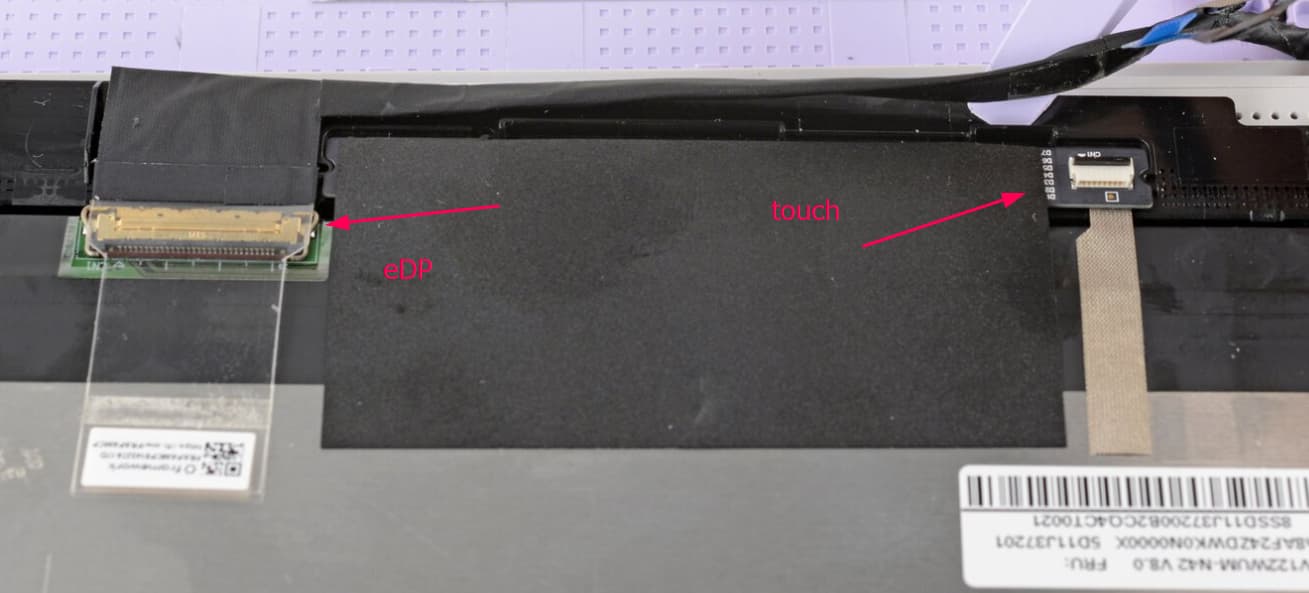
Hi All, I had a little accident with my F12 and needed to get a replacement for the screen. However, the screen still works and I would like to use it somehow. Does anyone have any advice?
Not sure how I might connect it to a device for display, but perhaps there is some way to connect this to a RPi or something with a passthrough device that can accept the ribbon-style cable of the screen and adapt it to HDMI/DP?
That is the device side which is a non standard laout (most device side connectors are), the display side is likely a lot more standard. Probably the de-facto standard 40pin 2lane with touch.
Best to confirm it with the display datasheet but it is pretty likely that one.
i quickly buzzed out some of the pins on my FW12 and it could be the 30 pin connector on the page you linked to, the cluster of pins from 18-21 (BL_GND) and 26-29 (BL_PWR) all showed as being shorted to each other
That would make sense if the touch interface was done separately, if not it is probably close to a standard 2 lane 30pin layout but with some pins repurposed for i2c,
Apologies for getting confused here, but the connector from the screen itself differs from the “device side” connector, which is listed on the Github? My impression was if I got a driver board that has HDMI to this 30pin connector I should be able to use this screen with other devices.
this information is not immediately useful if you just want to re-use the display, unless you take an extra step, like to buzz out one end of the cable to the other. “buzzing out” is where you use a multimeter in continuity mode to check if two things are shorted to each other, you could devise your own pinout for the display by going pin by pin and matching what pin on the known side (listed on github) and the display side match.
i did this myself with 8 of the pins mentioned on the link Adrian_Joachim provided for common eDP display pinouts, and based on that it seems likely this is the most common 30-pin eDP pinout, meaning most generic 30 pin eDP adapters “should” work for getting the display (not touch) to work.
Yes, the device side is documented and is pretty much different for every single laptop you see, the display side on the other hand is at least for lcds fairly regular (oleds are a bit weirder).