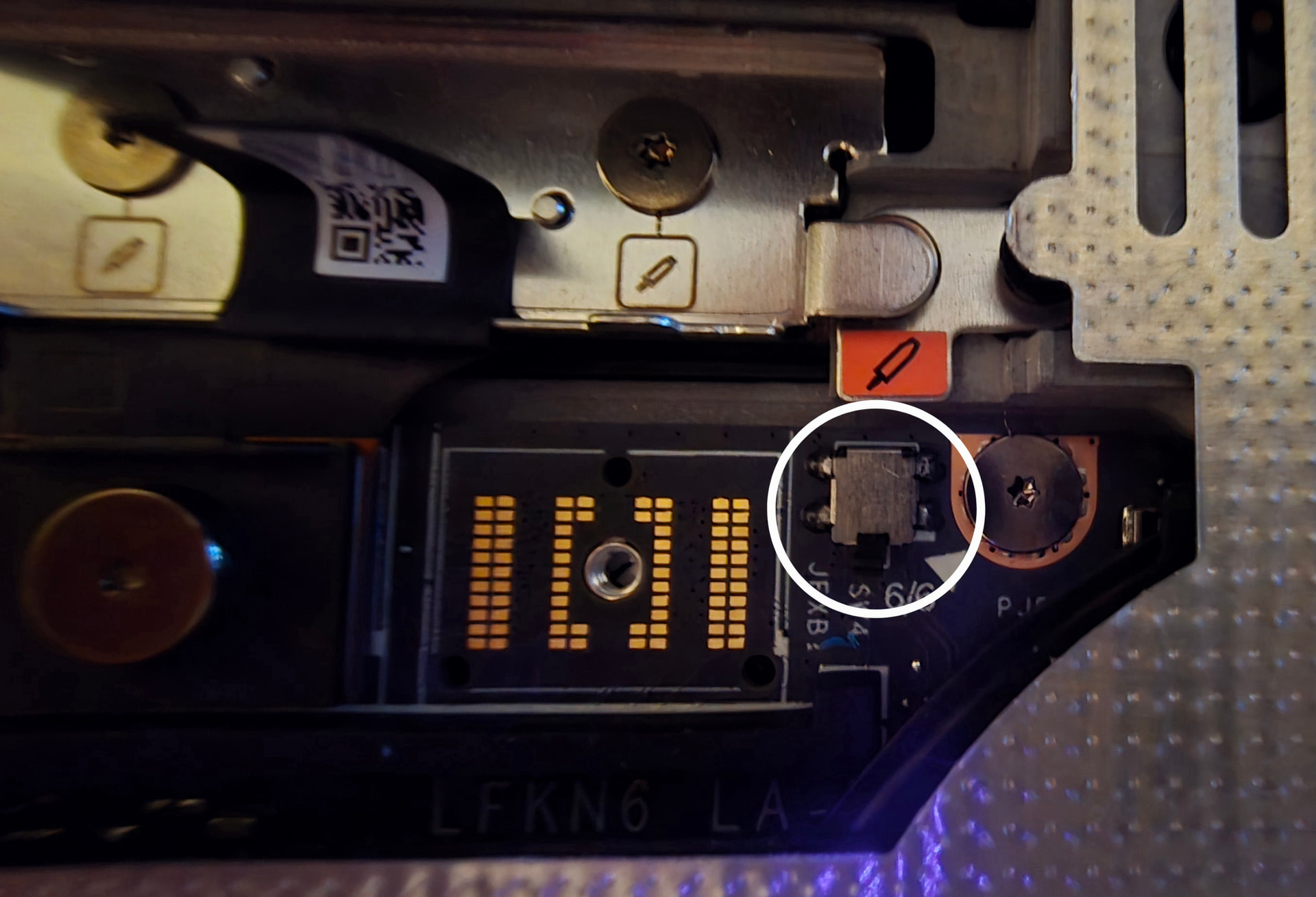
I just bought a graphics module update for my FW Laptop 16. While opening the interposer port to remove the old interposer and release the old extension bay, a component broke off the mainboard. You can find an image showing the interposer port open with a red arrow pointing to where the component used to sit at https://drive.google.com/file/d/18vskkGurQkPNqzGTOEPUGKXjajM0lWTQ/view?usp=drive_link. It’s a tiny silver square with 1-2 mm on each side. A bit more information that may be helpful:
I proceeded with the graphics module replacement anyway and was able to power up the cpu.
The framework driver update bundle software did detect the new nvidia graphics module.
The fans are running at full throttle since I powered up the laptop.
I have a few questions:
What are the consequences of not replacing this component and keep running my laptop without it?
Is the fact that the fans are running at full throttle a consequence of that?
What instructions can you provide to put it back? The component itself seems to be intact. The only thing is that it disconnected.
Would this fall into warranty?
Where can I find more support for this issue either way?
Warranty might be voided aswell due to the damage by user end if it is in this case if you have component. Bring laptop to a local repair place and have them resolder the component back since contacts, 4 silver squares are intact and hopefully the 4 legs on component is intact too for it to be soldered back.
After checking my laptop you have knocked off a tamper sensor it seems. It’s one of those that detects if laptop is open like a tamper switch, it has a small black arm or w.e it’s called that gets pushed down but once it’s up and then goes back down the tamper alert becomes triggered on next boot.
@jared_kidd
I was thinking the same. You can maybe get a replacement mainboard due to manufacturing fault. Those pads look too clean. I would have expected one or more of the pads to be a bit damaged, if force enough to rip off the component was used. @Eduardo_Bezerra
Contact FW via their web site support form to see if they agree.
no it is not, it has a tiny arm level sitcking out like others around motherboard, TIny lever sticking out can be pressed down.
This one is for middle plate/black cover, So i doubt it checks for expansion bay is connected correctly since there is around 4 more of these placed around motherboard.
This is mostley for tamper detection, if you enable tamper detection in bios this one can triger it once levers on it goes up when opening laptop chassi and then put it back together then BIOS trigers tamper detection and throws a super user password to boot or something like that.
Update: If you power laptop off and remove keyboard and such and you open the black latch orange and yellow/green light will start to flash on right side. So this is a chassi detector sensor not a component that checks if expansion module is connected correctly.
An update: I re-seated (took it out and put back in carefully, very slowly tightening the interposer screws) and the throttled fans problem disappeared. It looks like it’s working fine now. I double-checked in the bios that chassis intrusion check was disabled (thanks Jake) and while I was at it I also enabled standalone mode (let the thing run if the case is completely open).
A question I have though: what happens if I just use the laptop like this. To be honest, I want to avoid all the hassle of sending the mainboard back, waiting for replacement, putting it back and so on if I can.
What can happen (besides asking for password if I enable intrusion detection in the bios) if I just leave it like this? Can the laptop somehow live in “emergency/open mode” and leave my cpu/gpu throttled for safety? Or put my fans at maximum speed again?
I suggest you to contact support and show this to them and they might say due to it was user error the warranty is voided on the motherboard, so then you might aswell just buy new motherboard instead directly from store. Instead of sending it in. Since you will have to pay for either way anway .
A laptop is meant to be taken with you with everything attached to it without leaving anything open.
As long your work or life doesn’t present threats where you need to be concerned people might physically comprise your laptop, this missing switch won’t matter to you. If you’ve never heard of intrusion detection switches before now, it’s not likely a serious concern.
It’s not really an “emergency mode”. This switch just tells if the black plastic door over the expansion bay interposer is closed.
When you disable intrusion detection in the bios, you tell the laptop to ignore all such chassis or door switches.
Warning the you that you shouldn’t run the laptop with portions of it open or that you didn’t close the door properly, and as a secondary function, intrusion detection, is all this switch is for. No other function or consequence.
The fans not behaving normally was likely just that the interposer connection wasn’t good. The pins on the GPU interposer are really tiny, so it seems that it can be a wee bit finicky.
Some people won’t have the interest or spare time to contact support regarding something that doesn’t matter to them in any way.
And FW support very much should not say that warranty is void because the interposer door limit-switch came off. No part of the laptop is suddenly more likely to blow up, or otherwise fail because this switch came off. It causes no harm whatsoever.
Similarly, I fail to understand suggestions to pay a repair shop to do a rework repair. Doesn’t matter how easy it is, for someone with a proper rework setup and skill that is. It takes time, disassembly, equipment, and skill. They can and should charge for that. More than it’s worth, for something that doesn’t matter.
if they have the time to write on forum, then they have the time to contact the support.
But this person doesn’t want to ship motherboard in and wait for it to be repaired. Which can take time
Also door isn’t what came off, it’s a component on motherboard that user knocked off when installing gpu. So this would guranteed void warranty since it’s a user error not factory error.
I suggest you check topic from post 1 to end before you post incorrectly, since you look like you haven’t read everything properly. Eduardo has posted a photo link to a component that was knocked off when he was installing his gpu and that caused problem.
I posted a pic of same area of my laptop to show what kind of component was knocked off and it’s a DIP switch that detects if middle plate is removed or interposer hatch is opened, can be used for intrusion feature in bios so if enabled the switch will trigger intrusion and bios will automaticly lock itself and ask for super visor password.
The laptop has around 5 DIP switches soldered around the motherboard or if it’s 4 or something haven’t fully counted them yet.
Respectfully, I must disagree.
Have you read how long working through something with support can take? It being obvious what the issue is, does not always matter as much as one might hope.
Sorry but, huh?
I certainly make mistakes, but skimming back over just as a sanity check, I don’t believe this is one.
Perhaps I didn’t phrase it clear. I wasn’t saying the door came off. Rather the limit switch which detects if the door is closed, that came off. Serves dual purpose. 1) intrusion detection, because hey, the interposer is an internal port. Who knows what exploit you might find if you fuzz all those lines hard enough. 2) Telling you, hey, your door is open! Not the best idea to mess with that while the laptop is powered. At least I’m pretty sure it throws a warning. I hope it does!
Also, DIP switches are different. They look very different, and have a different purpose. This is a limit switch. All internal chassis open or door open switches would be as well.
it says DIP on this switch and DIP switch can look all kinds of design, you can google it and you will find similar switches with black lever sitcking out from side or ontop etc.
So this is forsure a DIP switch not a limit switch, but he said he put DIP switch back and after that fans stopped going like crazy. So this does seem to affect something probably becaus laptop is detecting the interposer latch is closed that presses down on black plastic lever so laptop knows it’s closed.
Unless you mean DIP limit switch? Since apparently we both are correct there after all, SInce when i search DIP limit switch it comes up as DIP switch / Limit switch so yeah.
Doesn’t matter a whole lot, but you might want to google yourself, before being sure about something. Or better yet, search mouser, digikey or arrow. For smd limit switch and dip switch.
Click for more on switches, that most won't care about
Some dip switches do have long levers, which look a little like the plunger on this limit switch. But they are designed for different purposes, and mechanically behave different. Dip switches are toggle, clicks and stays. They just don’t work for this purpose.
Limit switches are momentary, only “on” while depressed past their activation point, and provide a range they can be depressed beyond their activation point. Both are needed to be suitable for its purpose.
I looked at his picture, but you wouldn’t even have to. A description of where it is & what it seems to do would be enough.
No. Google is just not the best for some things, especially with relying on AI increasingly more. And with some results influenced by chinese part sellers on ebay & alie. Who make descriptions that include everything but the kitchen sink.
“DIP” switch is a specific type. Dip and limit switch are mutually exclusive. DIP supposedly stands for dual in-line package. Originally, dip switches used the dual in-line package format, as they are usually (though not always) a series of side-by-side switches which lends itself to that. They are no longer all in the dual in-line package, but the name remains.
But yeah, either way, we don’t need to fill the OP’s thread with back & forth.
First, thanks for all the answers! Specially MJ who addressed by specific questions about “what might happen?”. The FW community from my experience is pretty awesome, though I miss discord.
I never said I broke it. I was opening the interposer latch, and when I looked, there was this tiny thing free inside it. Maybe I broke it, maybe not. I for sure didn’t apply force to it. The “too clean pads” comments do make sense and it does look like weak/poor soldering. I don’t care about this component after MJ’s reply, but I worry that other components might be poorly soldered as well.
I never reinstalled the switch. Sorry if wasn’t clear. When I said I removed and reinstalled “it”, “it” was the graphics module, not the switch, which is safely stored elsewhere.
I did contact support already. Actually before making this post. But I wanted to know what the users thought, since multiple people think better than one.
Yeah, at least from the angle & resolution of the picture, I don’t see signs that there was a nice solder fillet. Many components don’t necessarily need it, for these switches it would help. Due to its plunger extending out the side, it would exert some levering force. I feel they should have used a switch with a different plunger design here.
I don’t recall seeing reports of components coming off, often enough to feel like a common problem.
I can’t second enough the “get it fixed at a local repair shop” trend. Fixing it would 1) make your 2k+ machine fully functional and 2) keep the resell value.
Easy fix for any remotely competent shop, and since you have the switch it is going to take literally minutes.
Good luck friend! Keep us posted with support, really curious about how they’ll handle this!
EDIT: idiotic typo that inverted completely the sense of my post. Sorry guys
yeah it seems we all missunderstood eachother there, i thought you meant you broke it or something but i could of missread that part myself.
But if you didn’t break it and there is no proof of it on component then FW hopefully will simply ship a new motherboard to you and about you putting it back i thought you meant the component and not gpu. So yeah, now i know you meant the gpu and not component. But i had feeling this DIP switch wouldn’t affect the gpu itself since it has nothing todo with it really, it only is for intrusion detection and to alert that the middle plate is removed or similar, since there is a few of these soldered around motherboard.
 if it is in this case if you have component. Bring laptop to a local repair place and have them resolder the component back since contacts, 4 silver squares are intact and hopefully the 4 legs on component is intact too for it to be soldered back.