I’ll be damned… thanks guys you avoided me some trouble. I wanted to add the latest WiFi support that’s why I went for the be200
Any thoughts on a WiFi 7 chip? I also needed Bluetooth. Maybe Qualcomm?
I’ll be damned… thanks guys you avoided me some trouble. I wanted to add the latest WiFi support that’s why I went for the be200
Any thoughts on a WiFi 7 chip? I also needed Bluetooth. Maybe Qualcomm?
If you don’t need wifi7 the ax210 is basically the most reliable thing available. If you do need wifi7, the qualcom is probably the best bet but it seems that bluetooth is a bit less reliable than on the intel chips.
Friday I got my mainboard in, abit sooner than I thought. Now I still need order for a powersupply & case. But because of holidays I most likely only have time to put together in the new year.
I just wanted to lock-in on the current price for the mainboard because of memory prices. I am thinking of mostly same setup as @Silph but with SF750w from corsair, what will stay 100% passive under 300watt’s, plus is abit more efficient than SF850w one. But not as good as what @NickV is using efficiently wise of course.
For now I’m still look at a good antenna setup, for the AMD RZ717. I got the Antenna module for framework case just as reference/testing, but with a aluminum case this will be a problem.
If anymore some more options case, psu & antenna wise let me know.
I finally set up with the ax210 as said higher. Ordered this one on Friday, I think it’s the right setup, but you need a place available to set it up.
Sure, 750 is the right spot.
Also did you use a normal width fan (2.5mm), I’m asking because on paper this should not fit with that case max moveble spine?
I thought this, too, but I stuck the Framework mainboard with a standard fan in the Terra and it fits pretty much perfectly.
I also didn’t seem to have a problem with the underside SSD’s heat spreader preventing attachment of the board to the “spine”. Assuming I haven’t crushed anything. 
One thing I’m not sure about is that PCI slot on top of the board; there’s no space in the backplate aligned with that. I’m not sure what sorts of PCI cards could even fit there.
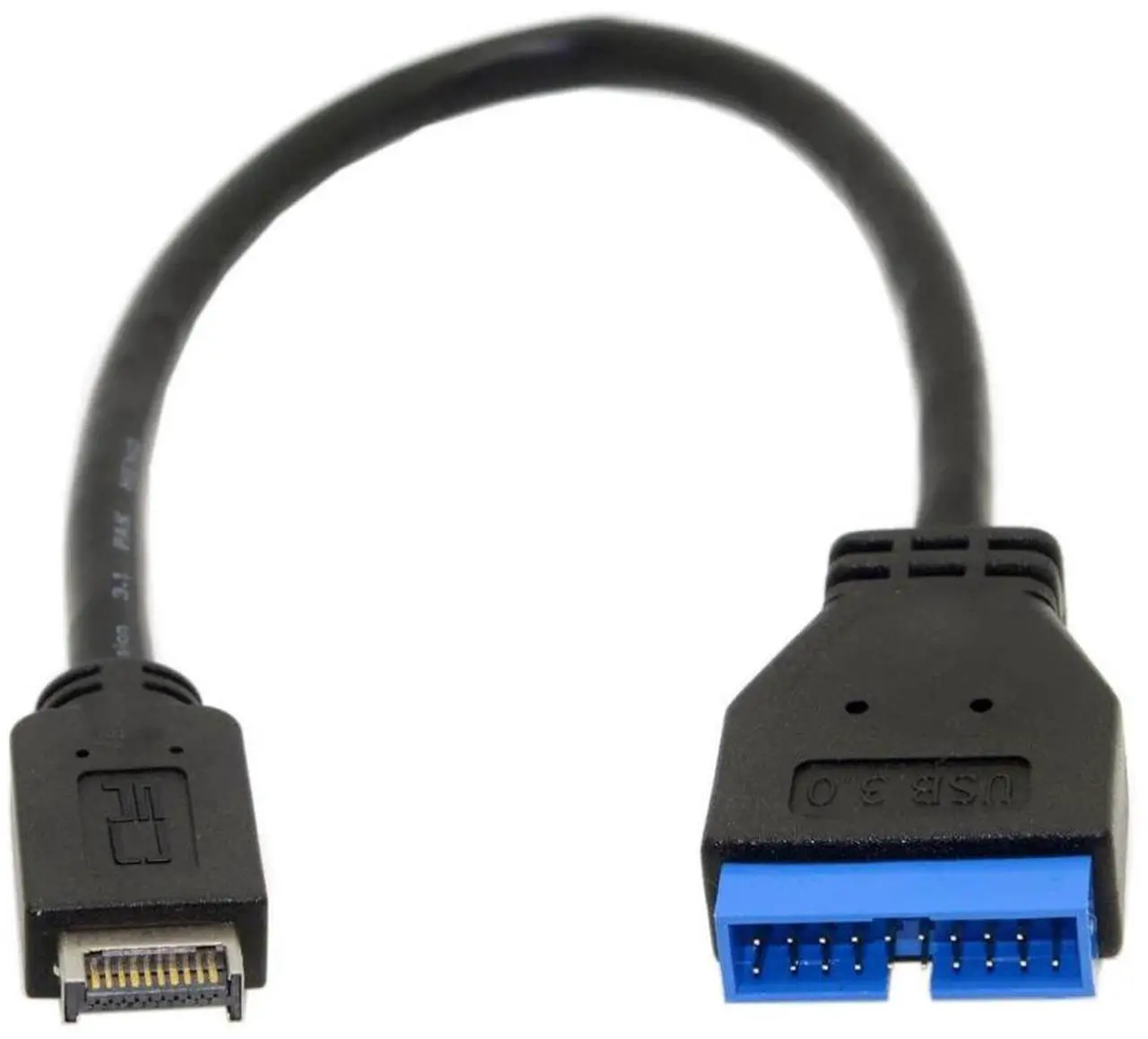
One other minor hurdle I ran into with this build: Framework Desktop only has USB Type-E headers, so the front panel USB 3.0 connector won’t work without an adapter. I haven’t picked one of those up yet.
I have an SF750 (2024) and beyond cold boot, have never noticed the fan spin up.
In terms of antennas, its surprisingly hard to find an MHF4 Wifi6e/7 (tri-band) antenna set, but these have longer wires than the FW antennas and depending on where you live, you may be able to find them on Amazon.
Tenmory WiFi 6E Antenna MHF4 Tri-Band
You could also look at MHF4 to SMA adapter cables, for attaching external/case mounted tri-band SMA antennas.
I’ve found the AMD RZ717 rock solid for WiFi & Bluetooth on Win11, and have been using the latest MediaTek drivers for both, which are available on the Windows update catalogue
WIFI: MediaTek driver v25.30.3.56
Bluetooth: MediaTek driver v25.30.3.56
@danj_ca & @RobG Thank you, for the information.
@danj_ca So USB Type-E headers to USB 3.0 20-pin connector, adapter. Let know what you find for that, because I’m not sure what I need to look for.
I still need to order the Terra/SF750 & NF G2 fan, as for antennas external still looking. With the holidays, I’m planning to order the rest before the end of this year.
I got a Deepcool CH160 when it was on sale for $50. It works, but beware that you can’t replace the secondary NVMe (the one in the back) after installing the mainboard. Also, you need a PCIe expansion card to connect the two front USB-A ports.
I purchased from amazon this cable Amazon.com: Thzzhnno USB 3.0 19/20Pin Male to USB 3.1 Type-E Header Male Extension Cable Adapter for Motherboard 1FT : Electronics and doesn’t work with my front panel USB-A (Fractal Design Terra)
I’m thinking to buy something like this and replace the original Fractal Design Terra USB-A front panel:
Glad I found this thread.
While patiently waiting for my Batch 17 to ship, I am considering a Soeyi/Acer U320. It being a ~15L is not really comparable with ~5L for a Framework Desktop, but I hope to use a PCI-e x4 to Oculink to support a dGPU (say an Intel Arc B60) and fit that into a compact-ish case.
Also considered Fractal Design Ridge but I believe that would probably be a difficult build (for me) if I am going down that path of hosting a dGPU.
I’m not sure if that will work for the Terra, as it super tight fit that USB-A port.
Also, the Terra has 1x USB 3.0 Type-A (5Gbps) not sure if adapter will ever work?
@Silph Are you doing something with the front USB-A port of the Terra? If so, let us know your workaround.
Yes, I agree. In fact, I am trying to understand the dimensions and space required for this front USB-A port, and before ordering another cable that might not work or doesn’t fit LOL, I am doing some more research.
Changing the subject, here is some information that may be of interest to Terra owners:
Antenna: Gintai WLAN Antenna PC WiFi 6E Tri-band - 2,4 GHz/5GHz/6GHz, WiFi 6E
I’m sorry guys, as I was running low on finances for this month I didn’t give it much importance yet, so I didn’t dig the issue. I’ll look to what I can find and let you know but I won’t buy anything until next month or February 
Pretty neat, I like it
For the antennas, the ones I bought were way bigger than I anticipated. However it works pretty well I think. They came with the support going on the pcie slots
Hmm. I ordered this, which should let me connect the existing front panel USB’s connector to the Framework’s Type-E header. It didn’t occur to me to replace the port entirely. Hopefully it’s the right thing. 
I didn’t see a lot of these for sale; most of what you find is adapters for converting the older-style header on your motherboard for use with a newer-style port connector, not the other way around.  But I did manage to find a few of these from generic sellers.
I would also prefer not to replace the USB-A port, but unfortunately the cable I ordered (apparently similar to yours) refuses to work! Please let me know if it works, so I can get one too  .
.
It might take a while — it’s on the way from China. I’m still waiting to receive a Noctua fan I ordered on the 2nd (the local carrier tried to deliver it to my local UPS store on Christmas Day, good job guys ).
But I’ll report back when I can finally try it out!
Hey @DE_SOUSA_Daniel - I chose the Jonsbo T6 did you end up with that?
If so I wonder if you have the same issue I do: system will not power off after shutdown on Windows or Ubuntu. I can’t tell if it’s the case or PSU that’s not playing well with the mainboard. Otherwise it’s just great! I had to go with a thin rear fan, but it’s all good and nearly silent. Thanks!
I did indeed choose the Jonsbo T6 case to install the Framework motherboard.
I used a Corsair power supply and two Samsung SSDs that I already owned.
For Wi-Fi/Bluetooth, I installed an MT7925 card, which works perfectly under both Linux Zorin and Windows 11.
The only problem I encountered was connecting the front panel USB 3.0 port. With a bit of tinkering, I managed to install it using an adapter like the ones mentioned in the thread above. I also installed one intake fan at the front and another exhaust fan at the rear. In reality, they all run at very low speeds and are completely silent.
I haven’t encountered any of the problems you mentioned.
Best of luck.
Want to make my framework diy desktop almost as portable as the original, but with expansion slot. Haven’t found anything better than Captain case v9 so far.