One of the keys on my keyboard, “w,” has slowly been flickering to the point of nigh-unusable due to its high inconsistency, and I am wondering if anyone knows why this might be, any fixes, and recommendations on what keyboard would be best to buy as a replacement.
I’ve relocated the keyboard to the left side (I previously had it in the middle) along with cleaning the contacts, reinstalling drivers, and inspecting the keyboard for visible debris or damage. None of this has changed the keys malfunction at all.
Same thing happened on my clear RGB keyboard. The W key would not work most the time. I assumed because I was gaming with it and wore it out…….but the issue eventually went away and it works 100% again.
I think the switch for the key must get dirty. Try blasting it with compressed air or taking it out and shaking it. You may be able to dislodge whatever is messing it up.
1 Like
Almost the same happened to me. E and W, and then Q, 3, 4 and Casp Lock slowly died on my Framework Laptop 16 RGB LED Keyboard (ANSI) after less than a year of usage. I asked for a replacement. Less than half a year later the new keyboard started dying in the exactly same way. After months of back and forth with the support, and even replacing the motherboard + midplate (crazy for something that is clearly a mechanical issue), the third one is coming my way. Next time it’ll break, I’ll be already out of my 2-years warranty.
To be clear, the keys are not dead 100% of the time. They come back to live occasionally, and degrade again. They may double/triple click, or may be unresponsive. Their issue is clearly mechanical, as can observed by corresponding interactive RGB LED effects (Ripple, Heat Map, etc). No amount of cleaning / blowing air helps. Different slots (repositioning) does not help.
At this point, after experiencing it myself and seeing lots of complaints on the forum, I assume Framework is just unable to make a functioning keyboard.
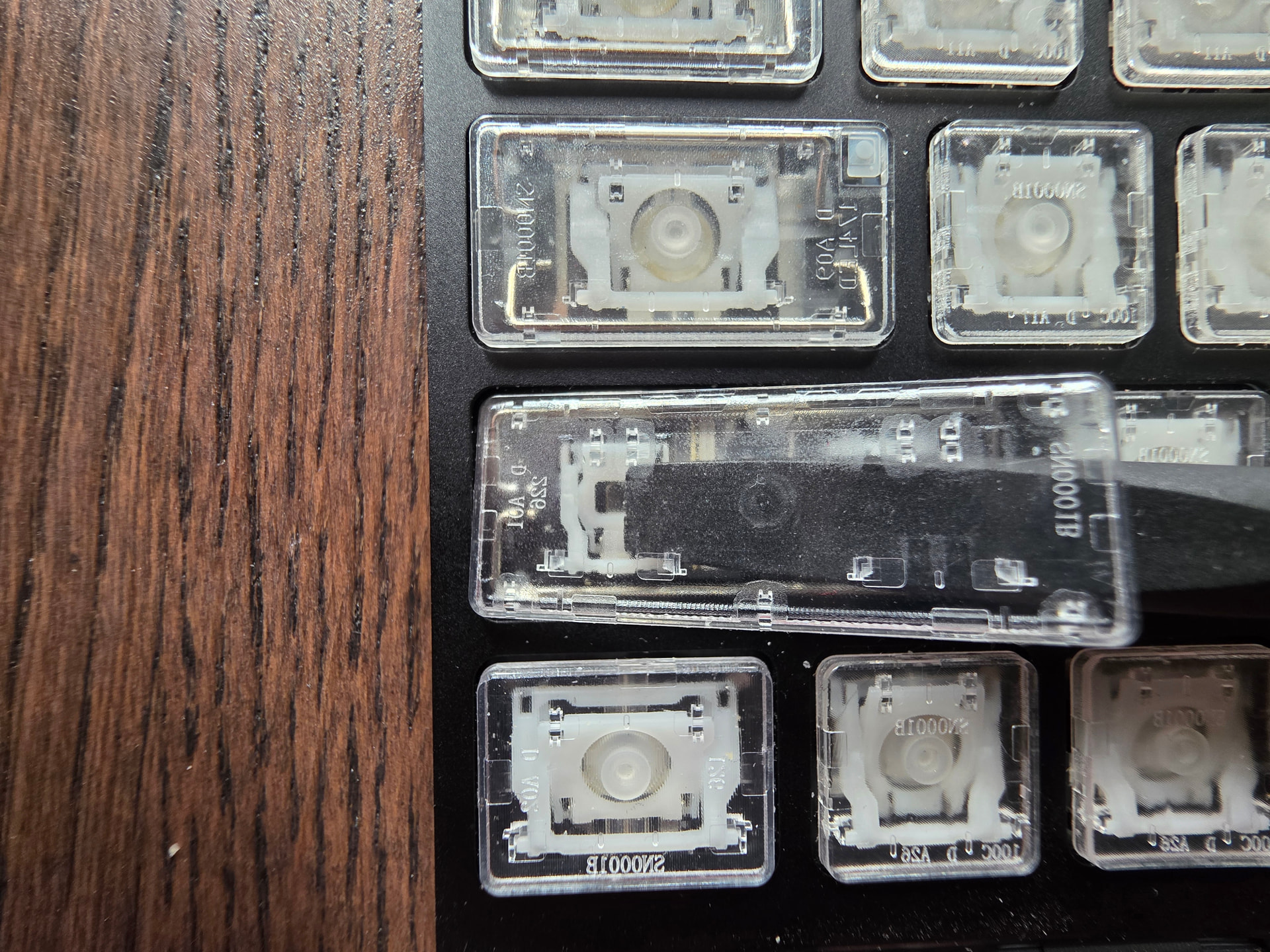
Sharing these images in case it helps anyone see how the keyboard keys are put together! I also found How to Fix a Laptop Key That's Broken or Unresponsive to be quite helpful to me.
My Shift key had stopped working consistently. The key would sometimes feel weird (soft, not clicking correctly), it would sometimes not register (especially when doing Ctrl+Shift+letter combinations), and sometimes would work fine.
Using the spudger from the Framework combination screwdriver and spudger, I was able to remove it first from the support bars and then from the key carriage. Inside, I found three pieces of debris. Two pieces of mechanical pencil lead and one leftover eraser crumb. I guess they somehow worked their way in through the tiny gap between the Shift key and the frame.
In any case, after cleaning out the debris and putting the shift key back on, it worked great.
Also I thought it was pretty interesting that even though I have the clear RGB keycaps, I was not able to see any of that debris before removing the keycaps.