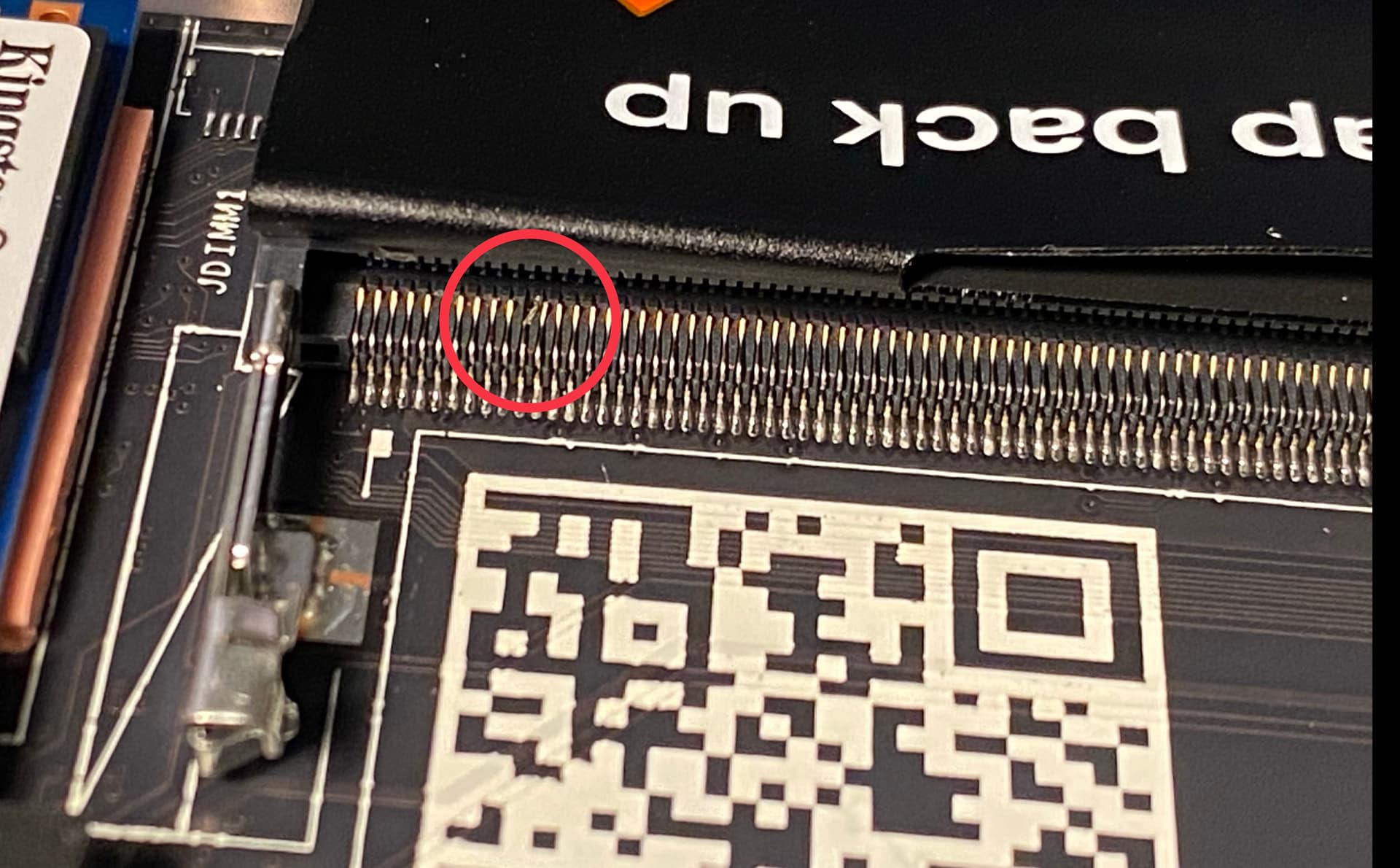
Hey future FW12 DIY owners, here’s a heads-up that might save you costs/time: before you install your memory module, carefully inspect that the memory slot’s pins all look properly aligned.
My FW mainboard’s RAM slot shipped with a bent pin, which renders it inoperable. I was able to physically insert my memory module, but the computer didn’t boot. At first, I thought memory training just took forever (black screen). It instead turned out to be a bent/damaged pin.
My externally purchased RAM module was new, and I noticed that the insertion into the defect slot had scratched it slightly. I’m not sure if this damage is only cosmetic, or will affect the future operation of the module in a functional slot.
I have a support case open with FW and I hope for a replacement laptop or mainboard, but I’m not sure if they will cover my RAM module if it is broken.
Conclusion: do a quick pin check before installing the module. This is not mentioned in the install guide.
I learned about this issue through the forum here, the symptoms were mentioned a handful of times for FW13 laptops too, see (1) New Framework with bent RAM pins? (2) Ryzen 7040 black screen no booting - #10 by Adrien_Turiot
This photo shows how the bent pin has damaged my module:
It is a disappointing first experience with Framework 
7 Likes
Somebody working at Framework will definitely want to hear about this. Bump.
Also, I got that exact module but in 48GB capacity. Have you had good experiences with this particular brand of memory before?
Support has now agreed to replace the mainboard after some back & forth. I hope that means that Framework is now aware of this.
I have not had any experience with Crucial memory in the recent past. The 48GB module had passed “limited validation” for the FW12, so I assumed the 32GB version would work as well. My module is the Crucial CT32G56C46S5.M16B2 (32GB, DDR5-5600) to be exact.
I am planning to try this module again in the new motherboard once it arrives, my hunch being that the very small scratch on the side of one connector will not affect memory operation, or worse, damage the new memory slot in turn.
I guess it would be helpful to know if a non-scratched version of this module should indeed work or not. I will report back.
1 Like
I don’t know about the validation status, but I am using a Crucial 64gb stick in mine and it worked.
I think the difficulty with this, is how did your ram slot pin get bent? It seems like it is only one. How is that even possible in the manufacturing process?
I had no doubts that Framework would get you taken care of, but it is curious, nonetheless.
2 Likes
The slot may have been a dud from the start but passed qc because it accidentally made the right contact when they tested it at the factory.
3 Likes
I think the difficulty with this, is how did your ram slot pin get bent? It seems like it is only one. How is that even possible in the manufacturing process?
Here is a theory: Ryzen 7040 black screen no booting - #15 by Second_Coming → a pin in the slot might have been bent while removing a very worn testing RAM module. I can imagine that deeper scratches on the RAM module could catch a pin on the way out. Similarly, my new RAM module might have been scratched before, and bent the pin, but I really think the pin was the cause, and the scratch was the effect.
I’m sure you could bend a pin while installing the RAM module, if you hit it precisely at an angle with the corner of the RAM or something. I can only say that I didn’t do this, I carefully and evenly inserted the module.
I do think my 11th pin looks worse than the images in the linked thread. It doesn’t just look bent. It might be the lighting, but it looks “shriveled”, for lack of a better word. It is not reflecting light evenly anymore. Maybe it was a faulty pin even before it was added to the module.
That thing looks to mangle to me for that damage to “just” be from being ripped out
Holy crap, I thought I was going insane and all my memory modules were dead or something. Take a closer look at the pins and one of them on the right is definitely bent downwards and probably not contacting correctly.
I received the replacement mainboard, and I now have a functional Framework 12  The 32GB RAM module is still working fine despite the scratch, though I should probably still do a memory test.
Memory training and the black screen on the first boot took about 80 seconds.
Replacing the mainboard took about ~30 minutes. I followed the iFixit guide, but it all felt pretty intuitive with the captive screws and markings, almost so that I could probably skip the guide next time. I’m impressed with the process!
3 Likes
I think I got the same error. Thought it was memory training at first. 30 minutes later, I’m convinced that it’s not. So I’m looking for answers, and I come across this. Sure enough, bent pin. It doesn’t look as mangled as yours, but there clearly is one bent pin and everything else looks pristine.
I’ll try to contact customer support tomorrow, but it’s not looking good for my machine. I would try to fix it myself, but I don’t have the dexterity for that.
1 Like
Sorry to see that! It should get sorted with support.
Your bent pin indeed doesn’t look mangled, but it does seem a lot thinner than the other ones? Maybe it’s the angle.
As for trying to repair it yourself, in my opinion it’s not worth the risk, unless FW would give some 2+ year warranty on the memory slot even after you try fixing it yourself. Maybe an already bad pin is more likely to bend again, break off or stop working somehow, especially on the next time you change RAM modules. It’s better to replace the mainboard while it’s still covered.
In my first message to support, I suggested that I was willing to attempt a repair myself, but FW support didn’t even reply to that. They just asked for more pictures/proof, and then proceeded to the mainboard replacement.
I hope Framework can find and fix the cause of these bent & mangled pins in their manufacturing/QA process.
1 Like
So, I did get it booting, but it was unstable. I swapped the ram stick with an old Asus laptop and now they both seem to work fine? Not sure what the problem was. It was a quality ram stick from crucial. Might have just been a voltage problem, but my guess is that the contacts on the crucial stick are just different enough from the other stick that the bent pin matters on crucial, but not the other.
The only bad thing is now my framework 12 has a small 8gb capacity, but my Asus has an awkward 56 gb capacity.
Good that it works now! The order page says the following about the FW12:
1x SO-DIMM slot supports up to 48GB DDR5 (running at DDR5-5200 speeds)
If you were trying a 56GB module, maybe that is the reason it was not working? Or should the FW12 be able to use 48GB of a larger capacity module?
There are no 56GB modules, likely the asus has 8GB built in and 48GB on an sodimm. (Or it has 64GB and (gb reserved for an igpu or something and op was just reading it wrong)
2 Likes
Yes, the Asus has 8gb soldered and one 8gb stick that can be swapped. So 48gb + 8gb = 56gb.
48GB is just what was validated and certified to work by Intel, other folks, including at Framework have reported that 64GB works, it’s just not validated.
1 Like
Same problem, different solution. Re-seated memory module. Curiously, support did not mention.
1 Like