Bought the new mainboard, impressed and giddy with it generally. Noticed this in the BIOS:
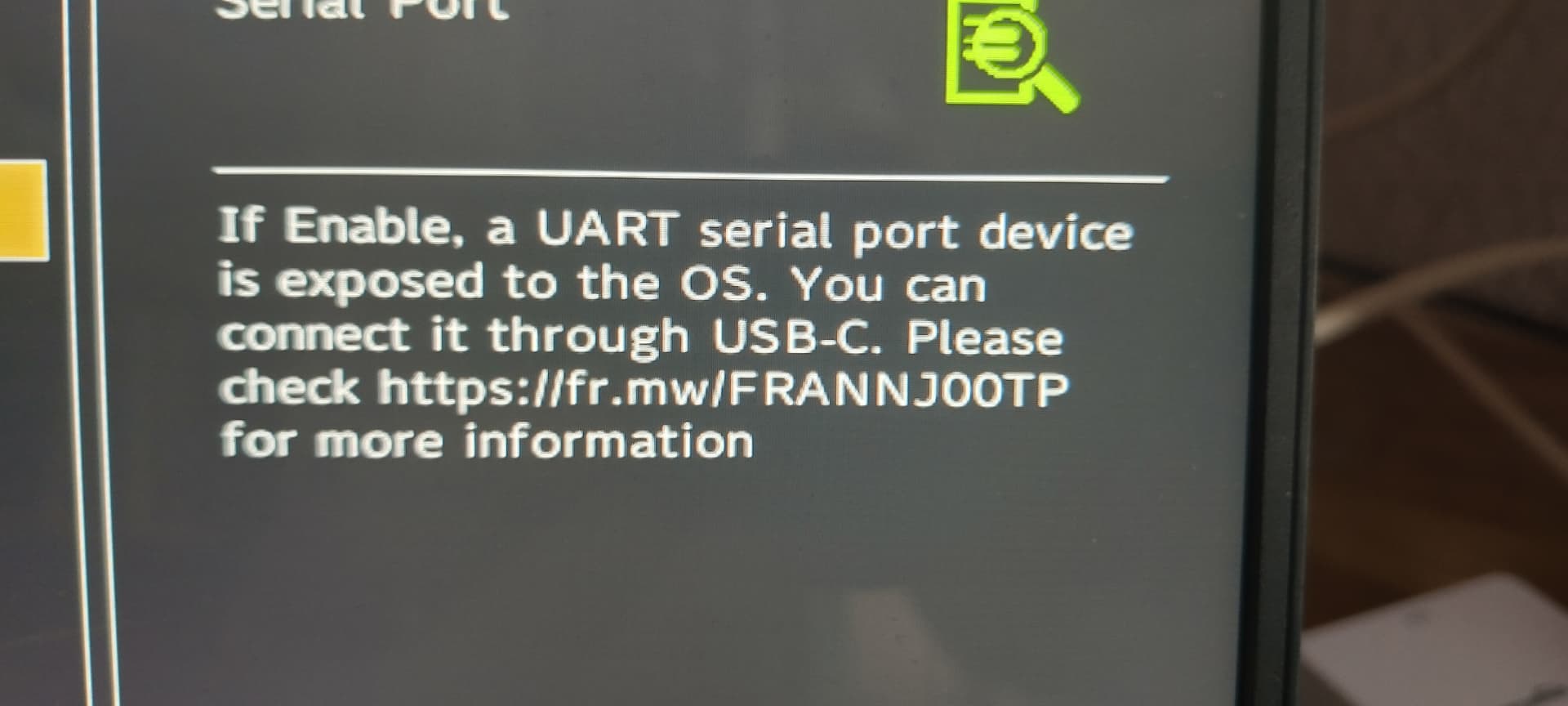
Last I checked neither https://fr.mw/FRANNJ00TP nor https://fr.mw/FRANNJOOTP actually loaded. Does anybody know what it’s talking about?
Bought the new mainboard, impressed and giddy with it generally. Noticed this in the BIOS:
Last I checked neither https://fr.mw/FRANNJ00TP nor https://fr.mw/FRANNJOOTP actually loaded. Does anybody know what it’s talking about?
I also like to know the answer of this one!
Seems like an as-yet unannounced new product + the feature that supports it. I bet we’ll hear about it in 2 days, at Framework’s upcoming event.
Through the simple expedient of diff-ing dmesg outputs with the variable on and off, I found this line appears when that setting is turned on:
[ 0.577709] AMDI0020:00: ttyS4 at MMIO 0xfedc9000 (irq = 10, base_baud = 3000000) is a 16550A
Trying the obvious thing
sudo minicom -o -b 3000000 -D /dev/ttyS4
doesn’t seem to get a response - Tried playing with some of the bit settings, and moving down to sub-three-million(!!!) baud rates, but no luck.
If it’s a new product feature, this is the weirdest ARG rollout I’ve seen to date.
So, nothing in the recent FW16 announcement about this serial port.
It is in the BIOS of the FW13.
My guess is that one will need a slot card with special wiring to present as a COM port to, say, attach another laptop to, in order to have COM serial port access to the OS.
Please can someone with a FW13 ask FW support for details of what wiring that slot card will need to get this working?
Updates: Both the links above were given a ‘Coming soon!’ landing page on the 19th.
setserial agrees with the kernel that /dev/ttyS4 is a hardware 16550A.
Still says “Coming soon!”.
Has anyone seen any updates from FW on this?
@nrp is there any chance that you can share with us more details regarding this Serial Port setting in bios? what is purpose of that serial port?
One of the on-the-front-page features of this hardware is that “ It’s yours! If you want to fix something there’s a handy link right there - Scan the QR code! “ It’d be nice if the links you gave us explaining things had something besides ‘Coming soon!’ for content.
I realize in TYOOL 2025 that taking money before the product is even built, then shipping a product half-finished is just the way people do business anymore - It’d be nice if you could actually put the money I paid into finishing the project BEFORE you start flinging it at random apparently unvetted projects?
I tried getting more information about this serial port via support@frame.work. I am hoping to use it for bootloader development/experimentation, but they said, “At this time, we do not have documentation showing the physical pins (Tx, Rx, GND) or headers for the AMD SoC serial port.”
I was able to successfully use the debug serial port connected to SoC’s UART by plugging a "EC Card 2", a closed-case debugging (CCD) Expansion Card for the Framework Laptop :: HowettNET in the upper-left USB-C serial port (the one closest to the screen) on a Laptop 13 with a AMD Ryzen AI 300 Series SoC.
close case debug was working earlier on FW16/ It gives you access to EC. This settings looks like something new
Yes, this setting is new. One can access the EC and the SoC serial port using the same expansion card but plugged into a different USB-C port (upper-left vs. upper-right).
Indeed. My EC CCD card can, in fact, be used to access the AMD SoC serial port. It uses the same signaling mechanism and means of PD muxing.
Thanks @dhowett - As an 11th gen user, still grateful for your firmware support.
To restate and double check for the less-bright (like myself), if the BIOS setting is enabled, the SoC emulates a 16550a serial port for the kernel - but in the real world it shows up as a 3.3v no-hardware-flow-control serial port over the pins as laid out on your webpage when the apropriate resistors are applied? Is there something good/useful about this that I’m not getting? I get why being able to speak directly to the EC is helpful, but this?
You can hook a debugger up to your kernel and debug kernel panics (or really anything kernel).
It would be really helpful if the FW bios output useful messages on the SoC serial port. Maybe even text for the bios menus, thus making the bios accessible to blind people.
If that’s possible, that would be awesome to have. Hell, I’m not blind, don’t need it, and yet I’d still like to have the option. Beyond its use for blind people, it could be helpful for headless mainboard use.
Well, yes. That is one of the things you can do!
You can also access your bootloader…
or configure your operating system to host an emergency console on it:
… which will be accessible when the network is down. 
Nice output!
I wonder what it does while booting, and no ram is found. Does it output any useful messages?


