I’d try pulling out the inserts that you’ve got on the right- and left-hand sides of the touch panel row, then seeing if you can insert the touchpad in the ‘far left’ and/or ‘far right’ orientation. This could tell you if there’s an issue with the touchpad mounting brackets or something else. You could also pull the inserts and see if you can install in the center location without the inserts in place.
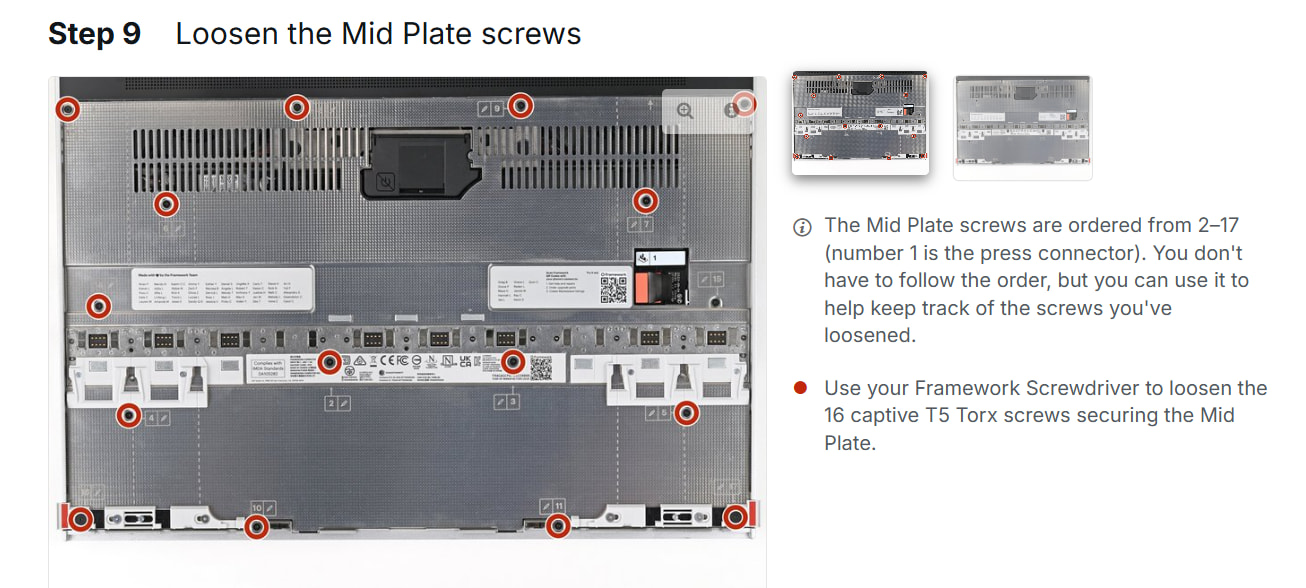
I’d guess from this latest info that the touchpad itself is not the problem point, so maybe the keyboard module is not sitting perfectly flush…? I’d think it worth checking that the screws for the metal "mid plate” are all sitting flush (i.e. the screws that connect the metal “mid plate” sheet under your keyboard/spacer modules/etc.).
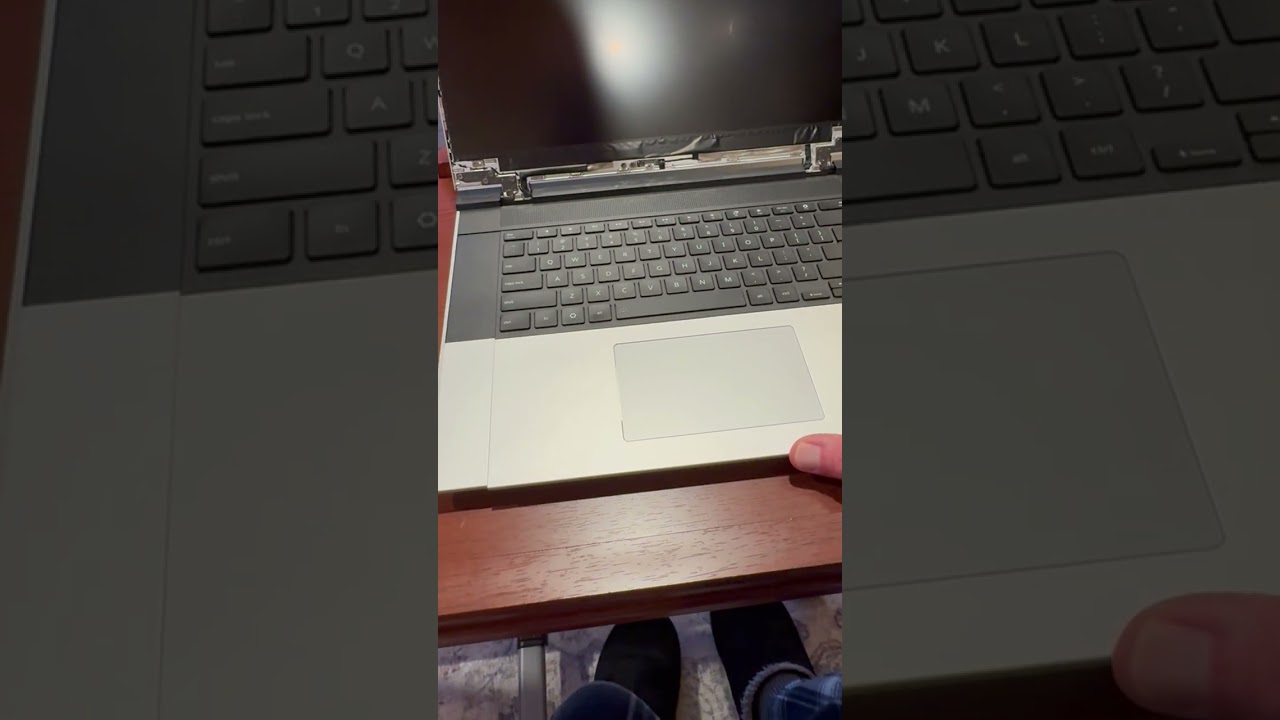
Getting a nice view of the unit (with your face or phone camera at the edge closest to you) might help proof out that the keyboard module is sitting down properly and that there aren’t any obvious items sticking up (screws in particular).
~~~
One more thing I’m pondering - probably more likely than the keyboard module not sitting flush. Considering that the touchpad fits in place on the right-hand side, did you check to see if you could slip both spacers side by side in the two left slots? It might be that the second-from-far-left plastic slot piece [part of the mid plate] is a bit malformed or bent, which could be proofed out by trying to fit both spacers in the left positions. I’m thinking about the white plastic slots in the following picture (particularly the right slots):
You know, I did this 20 times last night, including verifying all screws were tight. However, this morning I have it one more time, and voila….it worked.
This is not my first PC assembly, so I’m really surprised I had something off…but obviously I did.
Thanks! Very happy to not have to worry about a return process. I’m still not certain what fixed it, as I checked all the screws and they were already flush. However, fixed it is. I’ll take it
So I created a forum account specifically to reply to this thread, as it helped me with this exact same issue!
While I know my screws were snug, I did notice a couple of pieces of information that may help others who may encounter this problem. The midplate MUST be completely flat for the keyboard to sit flat so the touchpad can slide flush into place.
My problem: the primary SSD thermal pad fell off, I likely did not re-place it correctly, and it was causing the midplate to be slightly raised. This was enough to prevent the touchpad from sliding into place because it was bumping into the keyboard. After re-placing the thermal pad and carefully pressing to flatten out the midplate again, I was able to place the keyboard and slide the touchpad into place successfully.
So just to be clear, if the midplate is raised at all beyond where it should be, even the slightest bit, it could cause this problem.
I am not as lucky as you were. To me everything seemed completely flat and I couldn’t see anything from. I tried maybe 3 times to screw and unscrew the mid plate, until the screw 4 suddenly eroded too much (I didn’t even use much force) and is now permanently stuck . What can I do now?
Worth noting: I didn’t have any of the blue liners (mentioned in the DIY Quick Start guide) anywhere. Instead I had a long thick gray stripe weirdly on top of “Storage” or something like that (don’t remember clearly anymore) which I had to remove. I wonder if that should have played some role. The shape is similar to the blue stripe in this article:
Anyway, now it’s too late to change anything since I can’t open the mid plate anymore.
I tried using my FW16 after (force) inserting the keyboard, the numpad, the touchpad and the spacers. The touchpad is very slightly tilted and there is a small opening between the keyboard and the touchpad. Possibly because of this, the keyboard and the touchpad would every now and then stop working and only start working again (for a while) after giving a massage to the touchpad panel. (BIOS upgrade did not help).
Personally, I have a stripped screw removal kit that I use with a power drill. It works every time, although I do recall being pretty scared about damaging electronics the first couple of times I used it. You can pick that kind of kit up at nearly any hardware store. Dealing with tiny screws can be scarier than large screws, but they take less force - if you take this route, you could practice on bigger screws, then move on to your actual at-hand problem.
It turns out that there was a simple explanation for my main problem: I had missed the part where in the input module combination guide that said I must place the touchpad module to the right if my keyboard is on the right. That was the one thing I had not tried, apparently. Now everything fits and I have no problems with input.
I still have the problem with the stripped screw. I wasn’t able to solve it the easy way; the screw just wouldn’t budge. I will let professionals deal with this.
i know this is 16 days ago, but blue strip you see on guide is from new parts apparently. When you buy a new part like that plate it will come with thermal pad inplace but protected with blue layer on it, so you gota peel it off to reveal grey thermal pad under that is sticky and soft.
Mine also came without blue film on long and square one since it was mostlikely tested in factory before they re-packaged it and shipped it, so then they pelled the film off both.
Update: Ah, after checking link do they mean it will show blue film when thermal pad is lost and not before when you remove film? Since i saw some guide for 16 inch with blue film ontop of thermal pad too.
Had the same issue - thermal pad was missing the blue protective film and just randomly glued itself to mainboard. Put the pad where it is supposed to be, and touchpad module wasn’t quite fitting, until I slightly pressed the keyboard bottome edge down while pushing the touchpad module forward, then it’ll snugly fit in. You also may or may not need to slightly bend a bit aluminum cover of touchpad module so that its edges would match the edges of spacers.
Hi im having the same problem. Everything else goes in besides for the touchpad panel. Even if I put the panels to the left or right the touchpad still wont go in properly. When I do slide it in the 2 corners on the top curve up in a way not sure what to do…


 . What can I do now?