## Device Information
### System Model or SKU
Please select one of the followi…ng
- [ ] Framework Laptop 12 (13th Gen Intel® Core™)
- [ ] Framework Laptop 13 (11th Gen Intel® Core™)
- [ ] Framework Laptop 13 (12th Gen Intel® Core™)
- [ ] Framework Laptop 13 (13th Gen Intel® Core™)
- [ ] Framework Laptop 13 (AMD Ryzen™ 7040 Series)
- [ ] Framework Laptop 13 (AMD Ryzen™ AI 300 Series)
- [ ] Framework Laptop 13 (Intel® Core™ Ultra Series 1)
- [x] Framework Laptop 16 (AMD Ryzen™ 7040 Series)
- [ ] Framework Laptop 16 (AMD Ryzen™ AI 300 Series)
- [ ] Framework Desktop (AMD Ryzen™ AI 300 PRO Series)
### BIOS VERSION
Reproduced on BIOS 03.07 and 04.03
### DIY Edition information
Memory: Crucial DDR5 RAM 32GB 5600MHz SODIMM CL46 - CT32G56C46S5 x2
Storage: Crucial P3 1TB M.2 PCIe Gen3 NVMe Internal SSD - CT1000P3SSD8
### Port/Peripheral information
1. USB-C Expansion Card
2. HDMI (3rd Gen) Expansion Card
3. USB-A Expansion Card
4. USB-C Expansion Card
5. USB-C Expansion Card
6. USB-A Expansion Card
### Standalone Operation (Laptop Only)
Are you running your mainboard as a standalone device. Is standalone mode enabled in the BIOS?
- [ ] Yes
- [x] No
## Describe the bug
The laptop can end up in a state where USB-PD negotiation fails on all chargers, leading to the laptop not charging (i.e. charging at 0W) when on or in sleep mode. This started occurring when I updated from BIOS 3.05 to 4.03 at the end of January. I have been troubleshooting this and collecting data since then.
## Steps To Reproduce
This is a complicated issue that is tough to reproduce consistently. The best way to describe it is to categorise the working of the laptop into two states: "good" and "fail". I have collected data using various chargers in both states so that the difference can be compared.
When testing, I used an [Anker Prime 27,650mAh Power Bank (250W)](https://www.anker.com/uk/products/a1340-250w-power-bank?variant=45307568423076) running firmware v1.7.0, an [Anker Laptop Charger (140W, 4-Port, PD 3.1)](https://www.anker.com/uk/products/a2697-anker-charger-140w-4-port?variant=55120801661302) and the official [Framework 180W charger](https://frame.work/gb/en/products/16-power-adapter?v=FRANCR000G). For each of the scenarios below, I tested these with the USB-C to USB-C cable that came with the Framework 180W charger, a [240W Anker 765 USB-C to USB-C Cable](https://www.anker.com/uk/products/a8866?variant=42498009890980) and the 240W USB-C to USB-C cable that comes with the Anker Laptop Charger. The USB-C cable used did not make a difference.
I additionally have a [Dell WD19S USB-C Dock](https://www.amazon.co.uk/Dell-Dock-WD19-Power-Delivery/dp/B09126B8HZ?th=1) running [Package Firmware Version 01.01.01.01](https://www.dell.com/support/home/en-uk/drivers/driversdetails?driverid=p05vd&oscode=w2021&productcode=dell-wd19s-130w-dock) (WD19S MST version 05.07.08, Gen1 Hub version 01.23, Gen2 Hub version 01.62, WD19S Dock Ec version 01.01.00.15), which can supply [90W via USB PD 3.0](https://www.dell.com/support/manuals/en-uk/dell-wd19s-130w-dock/wd19s_user_guide/docking-specifications?guid=guid-22bfc1bd-cd42-4634-a014-993536756768&lang=en-us).
<img width="203" height="137" alt="Image" src="https://github.com/user-attachments/assets/3c605457-8efd-454e-b631-d260b7676035" />
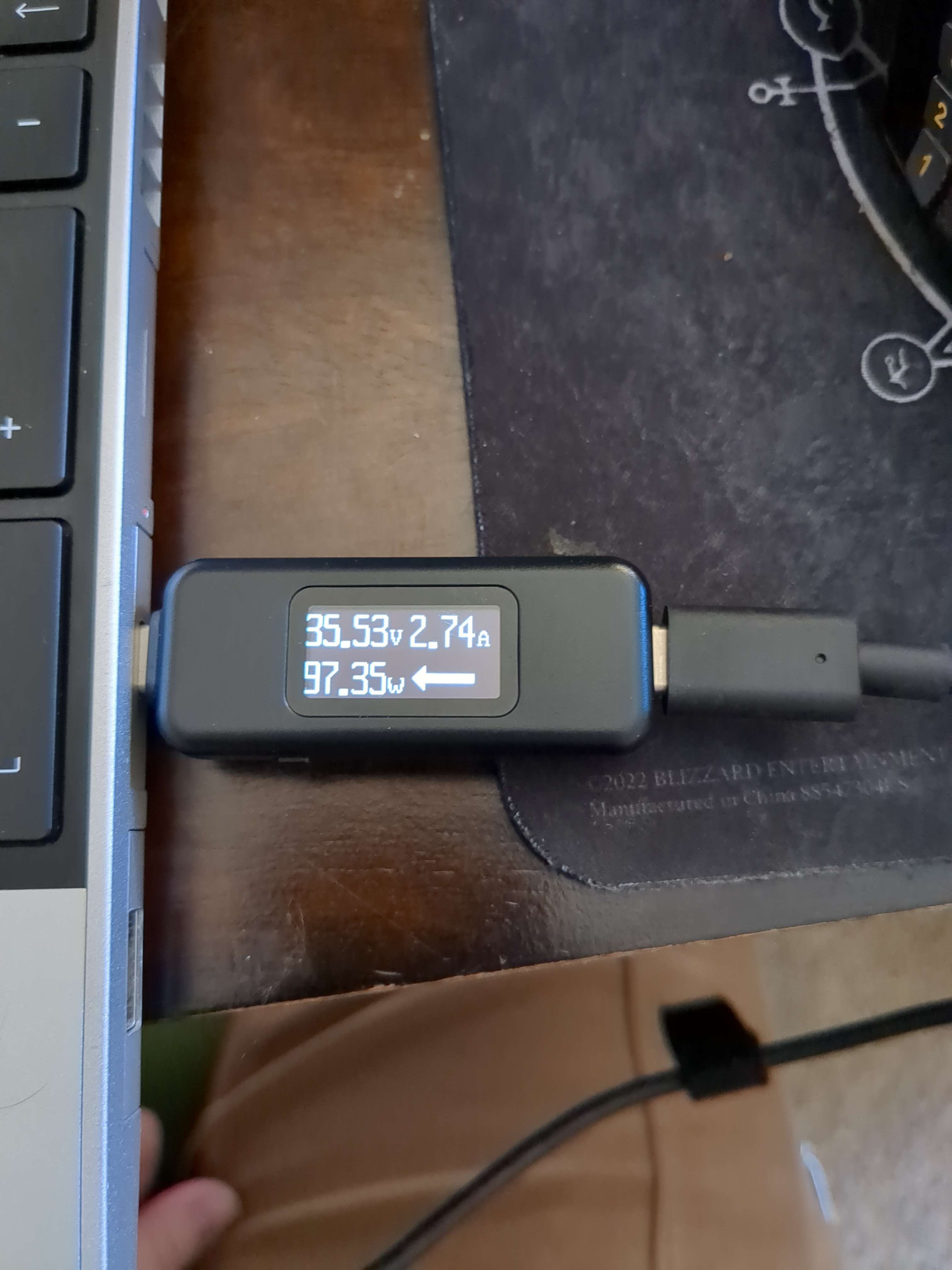
The Anker Power Bank and Laptop Charger both have screens which display power output. For each scenario, I have provided a photo of the relevant screen, and/or a screenshot from [Framework Control](https://github.com/ozturkkl/framework-control).
When in good state, charging works as expected.
<details>
<summary>Scenario 1: Framework 180W Charger (Good State)</summary>
<img width="878" height="212" alt="Image" src="https://github.com/user-attachments/assets/33a6b802-37b9-4a86-a7e2-cbaf0a591a1c" />
Here, charging is working as expected.
</details>
<details>
<summary>Scenario 2: Dell WD19S USB-C Dock (Good State)</summary>
<img width="1163" height="268" alt="Image" src="https://github.com/user-attachments/assets/3ae580b6-dbbf-45ec-9ce6-861f8794faa6" />
Here, charging is working as expected, but is slower as the dock only supplies 90W.
</details>
<details>
<summary>Scenario 3: Anker Laptop Charger (Good State)</summary>
<img width="1918" height="2558" alt="Image" src="https://github.com/user-attachments/assets/dceb7d19-05db-4fed-9a76-f83366cc3014" />
<img width="791" height="186" alt="Image" src="https://github.com/user-attachments/assets/d4051896-0254-4397-b810-68302a2057f4" />
Here, charging is working as expected.
</details>
<details>
<summary>Scenario 4: Anker Power Bank (Good State)</summary>
<img width="1745" height="2327" alt="Image" src="https://github.com/user-attachments/assets/4302c960-db5b-4691-be92-5e625543da7d" />
<img width="867" height="200" alt="Image" src="https://github.com/user-attachments/assets/51a89aa4-9c35-4e23-9d99-2b5ebe7d4a73" />
<img width="1607" height="2143" alt="Image" src="https://github.com/user-attachments/assets/e0a06522-15c5-4c47-bfff-29db9de5de9c" />
<img width="1793" height="2390" alt="Image" src="https://github.com/user-attachments/assets/d2ca3f15-5846-47e9-b0e6-cadec26da05b" />
<img width="864" height="205" alt="Image" src="https://github.com/user-attachments/assets/87b5f1bf-13df-4992-be63-683aa2caa434" />
The Anker Power Bank has two USB-C ports: C1 and C2. They are ostensibly identical, however, I am much more likely to get power when I use C2 rather than C1. However, I have seen both supply 0W before and I have seen both supply 140W before. 0W being supplied by the power bank does not necessarily mean the laptop is in the fail state. The known issues on the BIOS page does state that one of the issues is that "Cannot negotiate charging for certain portable EPR power banks.", which is what I imagine is happening here. Sometimes, this negotiates to 2W, which is interesting behaviour.
<img width="1674" height="2231" alt="Image" src="https://github.com/user-attachments/assets/72f2eb4f-ad50-420a-854d-806a873c3538" />
I do note, however, that I never had any 0W issues with this power bank on BIOS 3.05.
</details>
In terms of making the fail state occur, I have not found a reliable way to do this. It seems to occur randomly, but is more likely to occur when the laptop is on less than 40%, and is more likely to happen after I attempt to use the Anker Power Bank. It does not happen every time after I use the power bank, however, and I have also seen it occur without using the power bank.
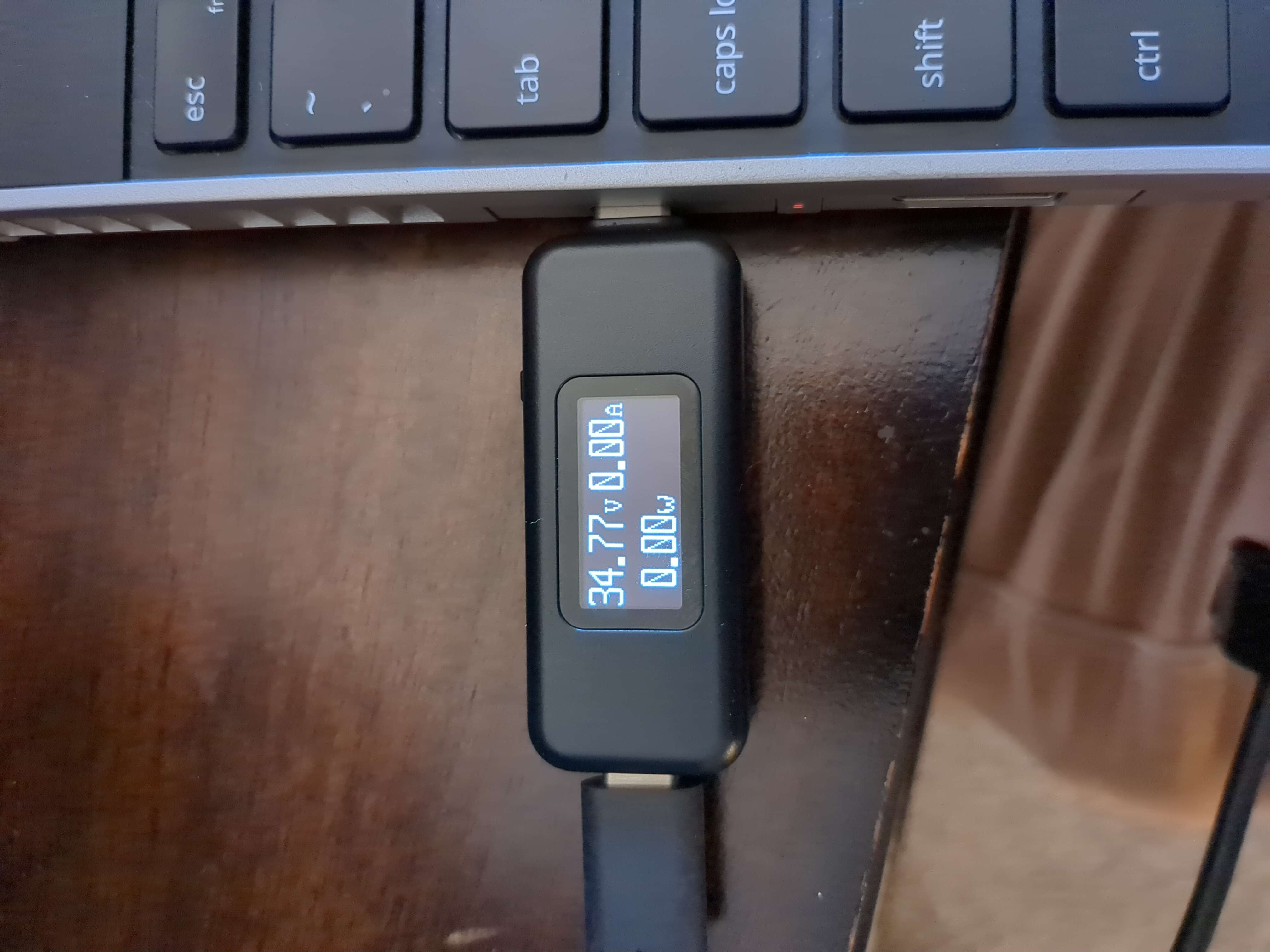
When in fail state, USB-PD negotiation fails, resulting in 0W charging when on or in sleep mode. This is also sometimes characterised by the battery state flipping rapidly between "Charging" and "Not Charging" in Windows, which is presumably the system rapidly connecting and disconnecting from the charger as it repeatedly tries and fails to negotiate charging.
<img width="632" height="252" alt="Image" src="https://github.com/user-attachments/assets/18647978-45bf-41d4-b186-365bfa3d97d4" />
Once it is in fail state, the best way to resolve it is to go into the BIOS and disconnect the battery, then wait a few minute before turning the computer back on. I believe this resets the EC. This does not always resolve it, but works the vast majority of the time.
<details>
<summary>Scenario 5: Framework 180W Charger (Fail State)</summary>
<img width="851" height="197" alt="Image" src="https://github.com/user-attachments/assets/1d888c8f-f4a3-4688-9769-91023fda4bf3" />
The computer is discharging here despite being plugged in.
</details>
<details>
<summary>Scenario 6: Anker Power Bank (Fail State)</summary>
<img width="1745" height="2327" alt="Image" src="https://github.com/user-attachments/assets/ae934479-6f73-4ef1-b717-d3b02602341f" />
<img width="867" height="200" alt="Image" src="https://github.com/user-attachments/assets/0701d35c-e724-4592-b2a7-695087fd1188" />
<img width="1607" height="2143" alt="Image" src="https://github.com/user-attachments/assets/51198669-344f-4e01-9caf-ee88426ceacc" />
The computer is discharging here despite being plugged in, and the power bank is supplying 0W. There is no difference here in terms of what is actually happening compared to when the power bank does not supply power in good state, so the photos are the same.
However, if I hibernate the laptop and then plug it in again, the power bank supplies 88W. I am not sure why this is, and why it is capping itself at 88W when it can supply up to 140W. I imagine the negotiation is simpler when the laptop is not on, which is why it is working but not perfectly.
<img width="1492" height="1119" alt="Image" src="https://github.com/user-attachments/assets/3054e4d7-deb2-4297-8ccb-f016a4e40b3e" />
</details>
<details>
<summary>Scenario 7: Dell WD19S USB-C Dock (Fail State)</summary>
<img width="1182" height="306" alt="Image" src="https://github.com/user-attachments/assets/9f7e2bbe-e92e-47e5-864f-6c62b29651e7" />
Interestingly, when I try to use the dock while in fail state, rather than discharging, there is just enough power supplied to keep the battery charge the same. To be honest, this behaviour baffles me.
</details>
<details>
<summary>Scenario 8: Anker Laptop Charger (Fail State)</summary>
I have also seen this occur with the Anker Laptop Charger, however I do not have any photos of this. The behaviour is the same as with the Framework charger, where the laptop is discharging despite being plugged in.
</details>
## Expected behaviour
USB-PD negotiation to complete successfully every time, resulting in charging at full speed every time.
## Screenshots
See Above
## Operating System (please complete the following information):
- OS/Distribution: Windows 11
- Version: 25H2 (OS Build 26200.7840)
## Additional context
Reverting back to BIOS 03.05 stops this issue from occurring (or, at least, I have not seen it occur on 03.05)
I have seen other reports of this issue (or similar ones) on the forums:
- https://community.frame.work/t/framework-laptop-16-ryzen-7040-bios-3-06-release-beta-held/73326/107
- https://community.frame.work/t/framework-laptop-16-ryzen-7040-bios-3-07-release-stable/75370/65
- https://community.frame.work/t/resolved-only-port-5-charges-ports-1-2-4-do-not-charge/75976
- https://community.frame.work/t/issues-with-usb-c-ports-charging-fw16/67967/
- https://community.frame.work/t/framework-laptop-16-ryzen-7040-bios-4-01-release-beta-held/77022/69
- https://community.frame.work/t/framework-laptop-16-bios-v4-02-and-driver-v3-01-releases-amd-ryzen-7040-series-stable/77774/127
- https://community.frame.work/t/framework-laptop-16-bios-v4-02-and-driver-v3-01-releases-amd-ryzen-7040-series-stable/77774/167
- https://community.frame.work/t/framework-laptop-16-ryzen-7040-bios-4-03-release-stable/79274/39
- https://community.frame.work/t/solved-usb-ports-1-and-2-won-t-work-on-my-framework-laptop-16/80786
- https://community.frame.work/t/cant-charge-unless-the-laptop-is-off/55566
I also believe the following GitHub issues may be related, however none of them describe this issue directly, presumably because it is so hard to reliably reproduce: #40, #75, #174
I do not believe this is a hardware issue, as charging can work fine, I did not see this issue occur on BIOS 3.05, and there are similar reports from other users. However, I have also opened a support ticket just in case.
I am happy to collect any additional data and/or do any more testing. Please let me know.