I’ve started writing a custom firmware for my RGB keyboard so that I can use it to display device performance stats that interest me, and I thought you all might find it interesting:
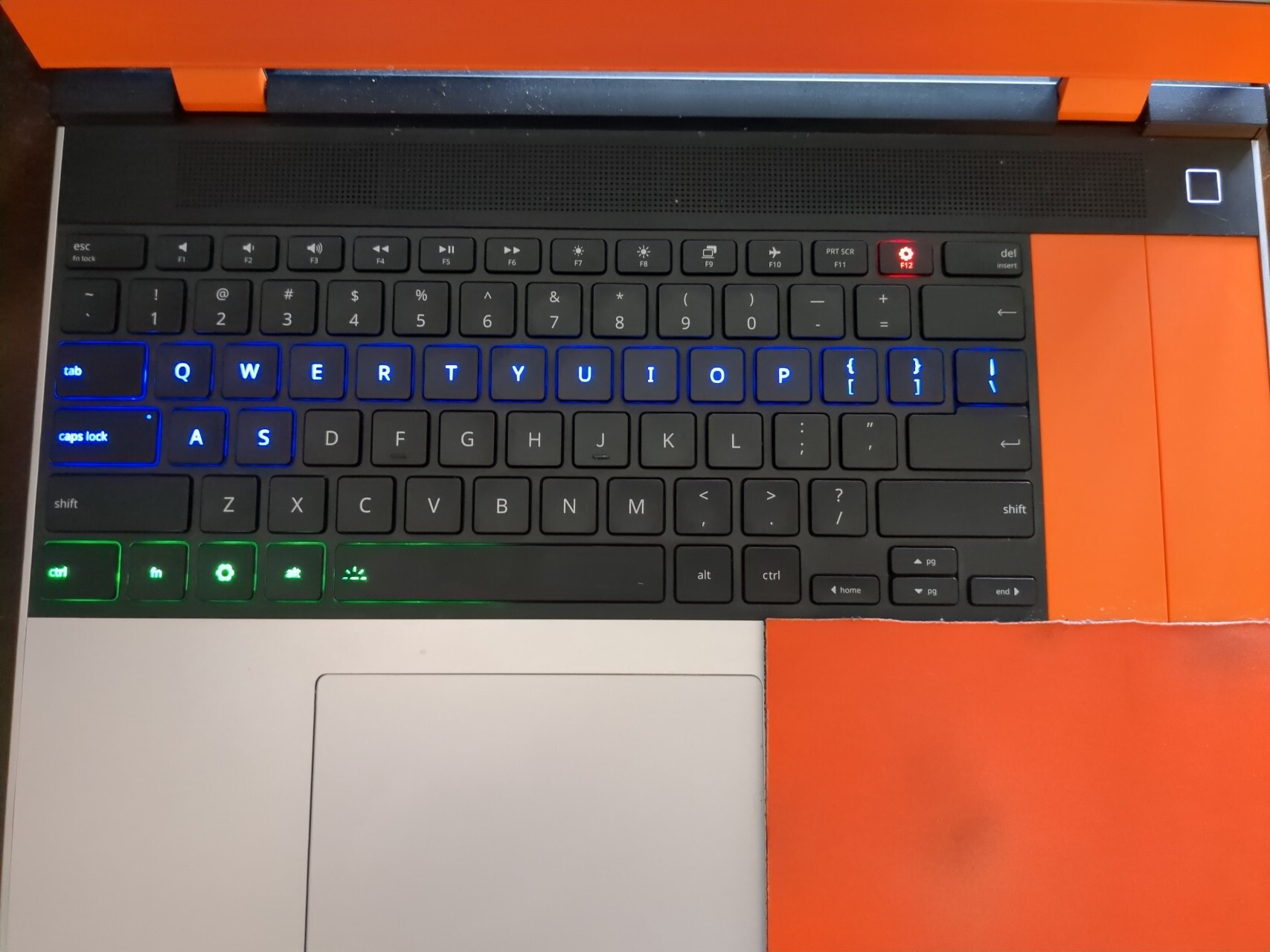
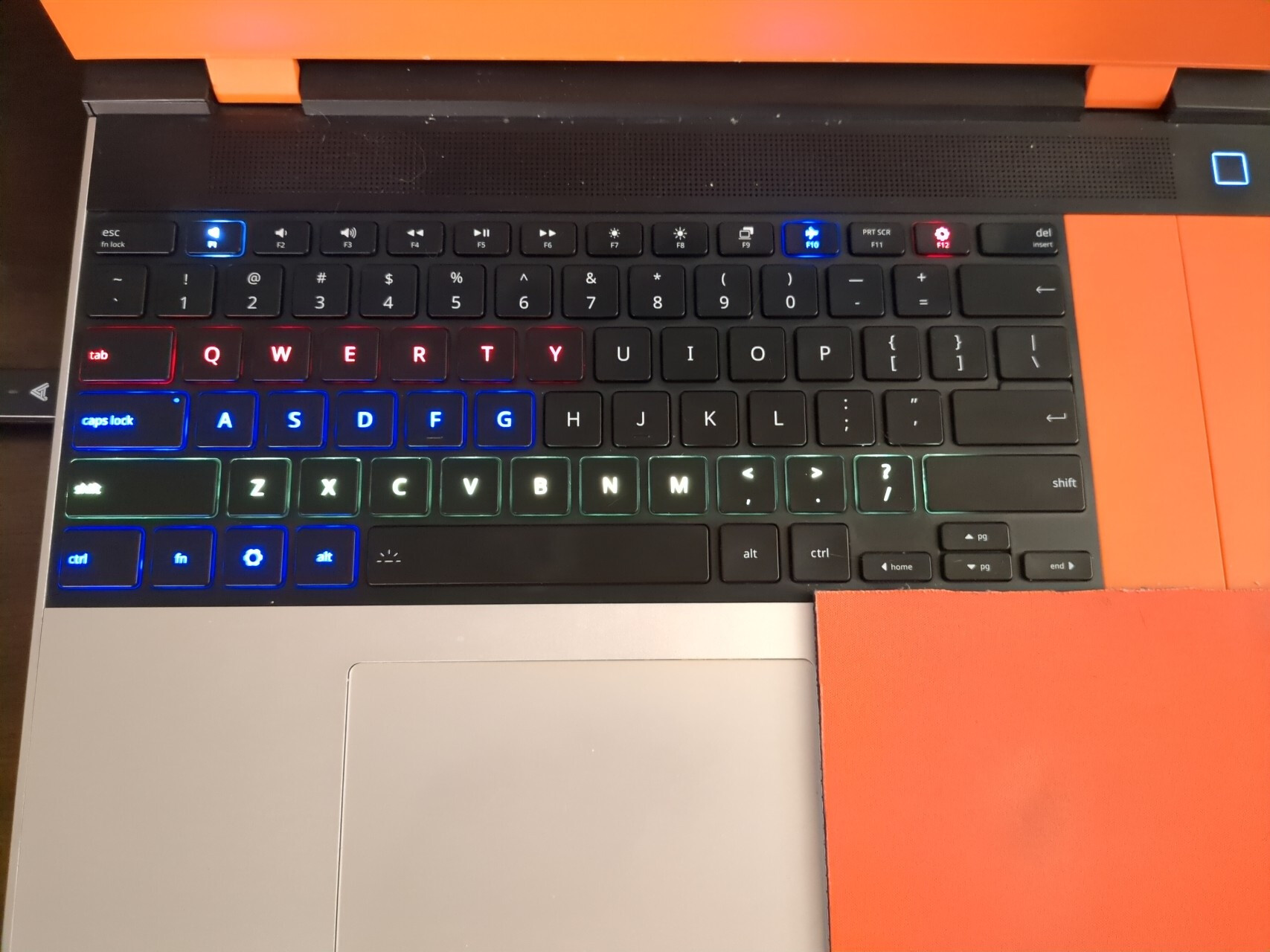
Row 3 Tab → \ represents CPU utilization and temperature (stress test running while photo was taken to show more lights)
Row 4 Caps Lock → Enter represents RAM usage
Row 6 Ctrl → Right arrow represents battery usage (power draw while discharging, % charged while charging)
Each row has color changes depending on what’s appropriate.
The F12 key (with framework logo) is used to show whether the dGPU is powered on or not. Red means it’s powered on, blue mean’s it’s in d3Cold. dGPU shouldn’t be on at the time I took that photo, so it’s already proving useful!
Update: I’ve also added mute and wifi status indicators since this was posted.
Future plans: Add a stat to Row 5 (likely GPU related), show current volume level and brightness level on the vol/brightness control keys, wifi connection status on airplane key, and etc.
I’d like to use the numbers 0-9 to show stuff that I want the exact value of. E.g., I could show 45% CPU usage by highlighting the 4 at full brightness, and the 3 at half brightness.
I’ve open-sourced the code, but it’s not polished or yet quite intended for people to make use of yet. Firmware Source Code:
Data Host Application:
Note that this is currently only built to be compatible with my laptop, on Linux. If there’s enough interest, it should be possible to generalize it.
OH… I wish I bought a RGB key board now I could not think of any reasons to have the RBG except just for the fun of it.. until now….
the speaker Muted/Unmuted , F2 and F3 are lower/increase volume.. could do some sort of fading of light between the two… so if F2 is bright volume is on low.. both equal its at 50% and F3 bright then max
ok thats it.. gonna go back to my corner and be all envious I did not think of such a good use for the RGB keyboard…
Yeah, this is something I eventually want to implement. Same with the brightness. I originally got the plain white keyboard for the same reason you did, but then one of the keys died and I needed a replacement.
I’m glad you found the project interesting . General reception has been far more muted than I anticipated, but then again I’m a data scientist and I love metrics.
This looks amazing… Any chance of this working on non-rgb keyboards? Though I suspect only the rgb boards have this level of control added on the hardware level…
As far as I am aware, only the RGB keyboard has individually addressable led’s. So, while it would be possible to do something with the white-backlit versions it would be more limited and probably require changing each key the same way. E.g., if the temp’s get above 90c, flash the keyboard on and off as a warning. Technically, I’d guess there’re are 2-3 zones that are independent, but they’re likely not usefully organized if so.
 I could not think of any reasons to have the RBG except just for the fun of it.. until now….