And I was wondering what kind of tests I should run to sanity-check the hardware and make sure everything is behaving correctly.
So far, I just kept monitoring the temps in HWiNFO while using the device, and everything seems fine, both when doing normal stuff and under bigger loads like games.
You can try OCCT, which is a stability test for PCs. Since recently OCCT is also available on Steam and for Linux. This tool is normally used by overclockers to test for system stability. OCCT is free, but the free model has ads and wait time—if I remember correctly—and may not have all tests available. OCCT also has a benchmark tool, but I don’t know how good it is.
You can also try MemTest for checking if the RAM works 100% correctly, although 128GB could take a while, I’d imagine.
Else, you can try every other benchmark/stress test like 3DMark (33.99€), Cinebench (free), and so on.
I run CPU Temp which stays constantly on my task bar. If the CPU hits over 80 and stays there, something is wrong. It’s either a virus running in the background or something is messed up with the hardware. I have done memory checks too but for the most part if you are on Windows the OS will detect those issues and BSOD on you.
Good old quick and dirty “7z b” to crank it up, check the fan etc. (Install 7zip, run “7z b” from command line, linux or windows). Also archive something big to be doubly sure about the fans.
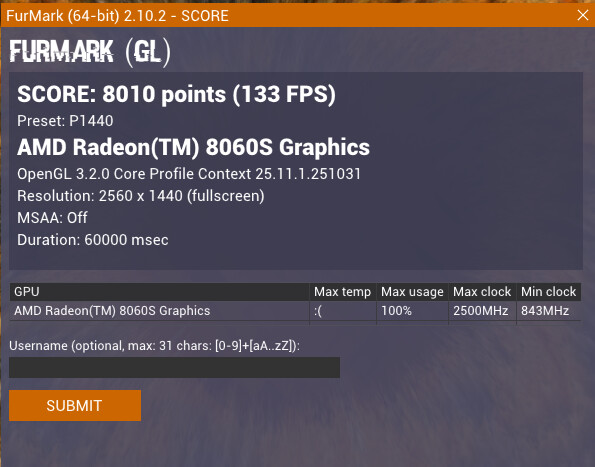
I’m honestly a bit surprised by the disparity. I have the 64GB version, but I don’t think it impacts the processing, but I’m surprised by the comparatively much higher multi-core score. However, FurMark Score is easily more than 10% lower than yours. But your power consumption and temperature are always higher on your end. I didn’t track it to the same degree, but I’m left a bit stumped. Max draw was never higher than 115 W on my end.
But I’m still not convinced, will look further into it when I have some more time. Currently, I think it might also have something to do with the crappy drivers.
But yeah, it’s weird, and your lower GPU score is also very weird, not sure what is going on…
Whatever it is, I hope I will find out before the warranty runs out lol.
But yours is not going over 115W, that is also unusual… are you sure you don’t have some Balanced Power Plan or anything similar turned on? Mine is set to Best Performance.
Regarding the temps, I think my heatsink is not mounted perfectly, and that’s why, but I never took it apart yet, as the temps rarely went above 90°C, only when pushing it for hours with TestMem5. FW Desktop heatsink not mounted properly?
I had a weird bug with the energy management, so now I also matched and had the same GPU ratings as in your examples. So, that mystery was also solved thanks to you and thanks to the ability of comparison. So honestly, my lone issue remaining is the lack of reliability of the AMD Drivers. Thanks! I ran all the rest I could and I couldn’t figure out anything actually wrong.