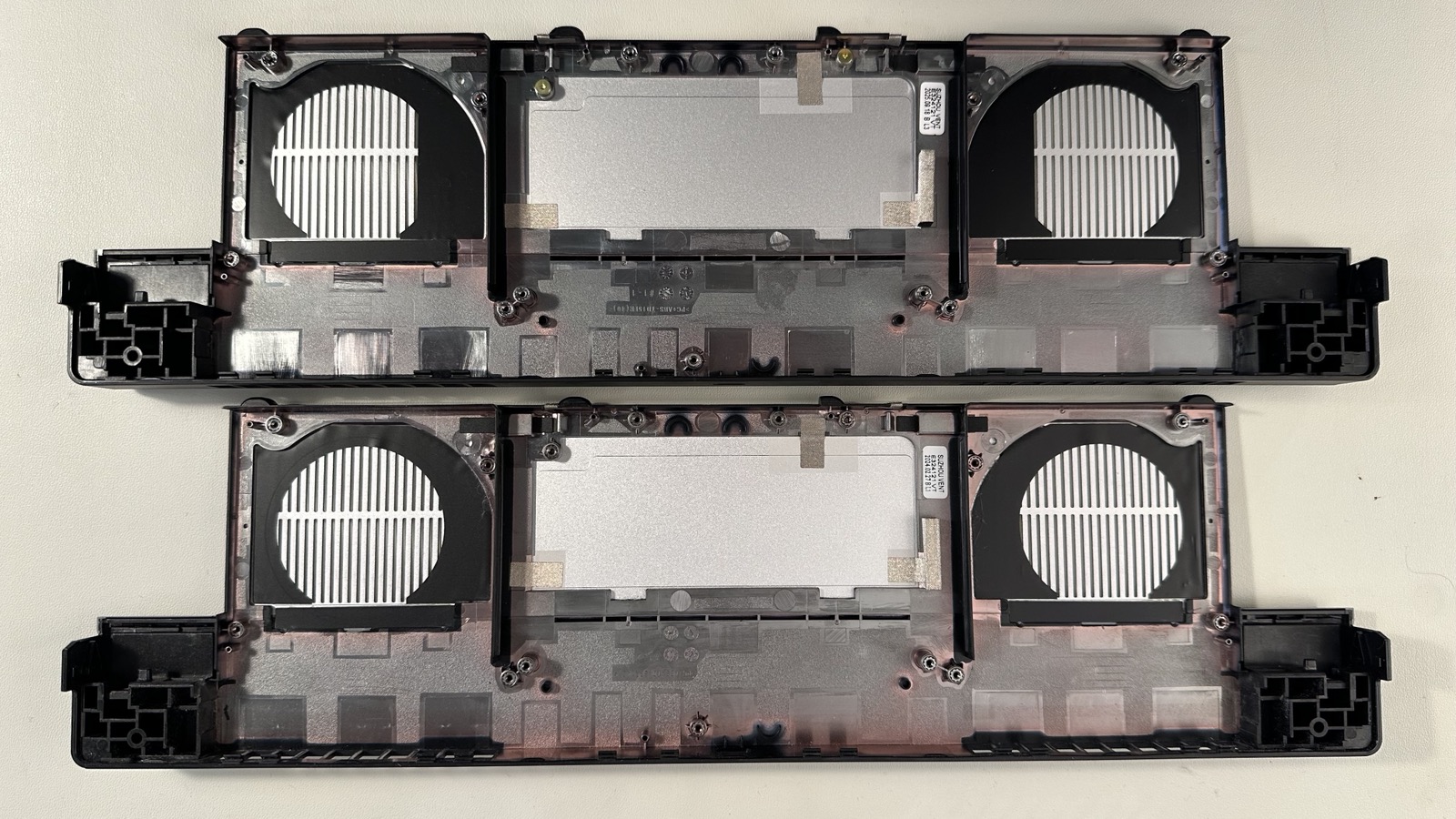
I noticed in the video he mentioned the Radeon RX 7700S is a 2nd gen. Did I miss where he breaks down the differences or changes between the 1st and 2nd gen?
At first I thought the 2nd gen would include the ability to charge from the rear USB-C port to bring that to match that functional parity with the 5070 GPU, but on the website, it didn’t say that (just USB-C with alt displayport, just like on the OG version).
Changes to the shell itself, new fans (fan blade design) and ptm instead of cooling paste. No PCB changes. It is the same, basically some optimizations.
Does anybody know if installation of 2nd gen fan is going to make it 100% like fans on 2nd gen 7700S module? They specifically mention reoptimizing the fan blade geometry and controller IC for reduced noise. What do they mean by controller IC? Is that located on the fan itself or on the new motherboard?
This is pretty much it. I believe that these changes to the 7700S are also on (from?) the 5070. Maybe they made it for the 5070 and realized it would improve the 7700S. Either way there are fan, thermal, and acoustic benefits from this gen 2.
I hope someone test the new 7700S. I’d be curious to see how much of a difference it makes.
Is charging and display out over one cable possible with the new AMD Module? And if so, will it be possible when only switching to the newer AMD-Graphics-Module and leaving laving the rest of the FW15 in GEN1-Stage? Is 240 Watt possible over the graphics-Module?
It’s my understanding that only the RTX 5070 is getting the charging through the USB-C connector. I’d assume adding that to the 7700S would require a complete redesign of the GPU.
Can Framework sell the 2nd gen shell separately? I would really like the improved thermals and acoustics but I do not want to pay for an entirely new GPU.
I bought the 7700S Gen1 originally and the fan noise was really bad, even under moderate load.
Then I got the 7700S Gen2 and it’s significantly better, so I definitely recommend Gen2 if you can manage the price difference.
That is certainly interesting, but I don’t think I want to make those modifications to my laptop personally. A good thing to bring up for this post though, could help someone if they really want it!
Can anyone confirm if the 7700s Gen 2 actually has PTM? They have a second gen fan set and shell in the marketplace, but nothing for heatsink or thermal pads.
AFAIK that thermal pad (size C) is compatile with Framework Laptop 16 GPU. I am currently waiting for mine to arrive along with second gen shell and fans. To be confirmed.
Moving the GPU to the Updated Graphics Module Cover
I recently moved my 7700S GPU to a second-generation graphics module cover and installed the second-generation graphics module fans. I was unable to locate a guide specifically for replacing the graphics module cover, but it turns out to be pretty easy. Start with the Graphics Module Fan Replacement Guide: Graphics Module Fans - Framework Guides. Follow that guide and remove both fans. Next, remove the three screws that hold the GPU to the graphics module cover. The three screws are circled in red in the attached photo. After removing those screws, simply reverse the steps using the second-generation graphics module cover.
Differences Between the First- and Second-Generation Covers and Fans
The vents in the second-generation graphics module cover are slightly more covered compared to the first-generation version. In the photos, the second-generation graphics module cover is on top. The second-generation fan has a new curved profile, which can be seen in the photo with the clean fan. The first-generation fan is flat, as shown in the photo with the dirty fan. My guess is that this change, along with other updates to the second-generation fan (such as blade count and other internal changes), helps reduce turbulence and shift the frequency of the fan noise. The fans seem to turn on about as often as before, but the sound is now more like background fan noise, less noticeable and more bearable.
Thermal Pad
The updated GPU thermal pad (Size D) is not currently available, so I have not replaced the thermal pad yet.
Side Note
As a side note, I also installed the second-generation top cover kit, and it is noticeably more rigid than the original.
The gpu die is larger than the cpu die and size C is for the CPU. When I repasted the dGPU, I was not left with the impression the PTM size c would work.