I received my laptop yesterday but have been unable to get the touchpad to work. I’ve tried to get it working on CachyOS and Windows 11 but the closest I’ve gotten it to working was an error about failing to get the HID descriptor in device manager.
I have tried reseating the module, cleaning both the pins and the connector and getting all the necessary drivers. The module, and all parts of the input connector seem fine aside from one of the pads being torn off from the touchpad module.
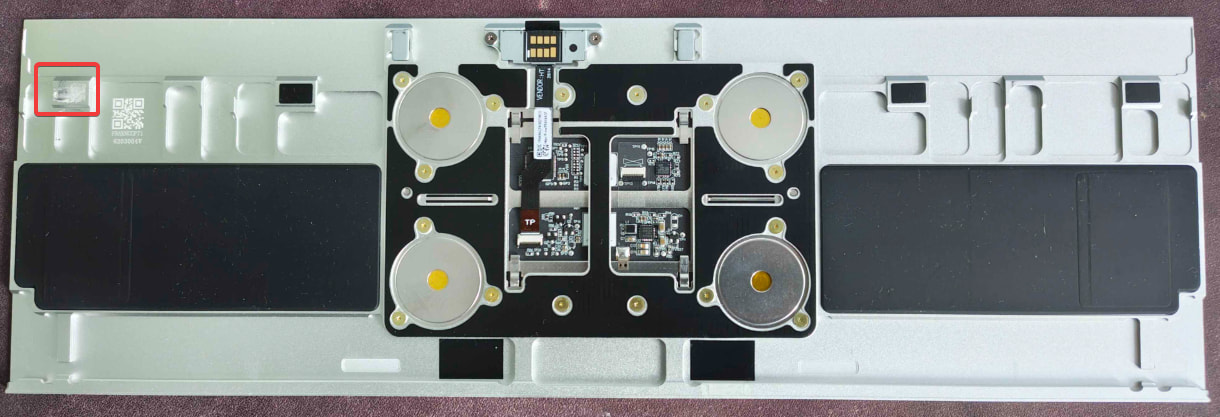
Would you show the output of some status commands for this module? Maybe dmesg in Linux.
Please also show a screenshot of the error you refer to in Windows.
Here’s the windows error and the output from “libinput list-devices” and “dmesg”
dmesg - Pastebin.com | libinput - Pastebin.com

Similar thread: Touchpad NOT working - I2C HID Device Code 10 WIndows 11
Quite a lot of results on the web: windows i2c a request for the hid descriptor failed at DuckDuckGo (not just a FW problem).
Thing is, this is the newer haptic touchpad module (iirc first batch to include it) and I haven’t had better luck getting it recognized on linux so I don’t think it’s a windows issue.
I’d recommend logging a support ticket, but hopefully someone who has this touchpad working on a FW 16 can show their dmesg/libinput outputs, and anything they did to get it working.
I have this touchpad on the 16. Unfortunately I’m very disappointed by the keyboard and touchpad responsiveness and overall quality. It “works” out of the box on Ubuntu 26.04 without any additional packages. I came to the forums to try and find out if there is additional configuration to fix the problems that I am encountering.. seems like not. Happy to dump output from my “working” unit to help.
Current issues:
- Keyboard and keypad disconnecting constantly (as evidenced by dmesg). This is really annoying. The build quality on the modular keyboard is not great on this laptop.
- The touchpad works for a few minutes but then enters a mode where it is extremely sensitive and does not leave “click” mode.
$ sudo dmesg | grep -i -e hid -e touchpad -e haptic
[    0.070128] AMD-Vi: ivrs, add hid:AMDI0020, uid:ID00, rdevid:0xa0
[    0.070130] AMD-Vi: ivrs, add hid:AMDI0020, uid:ID01, rdevid:0xa0
[    0.070130] AMD-Vi: ivrs, add hid:AMDI0020, uid:ID02, rdevid:0xa0
[    0.070131] AMD-Vi: ivrs, add hid:AMDI0020, uid:ID03, rdevid:0x98
[    0.070131] AMD-Vi: ivrs, add hid:MSFT0201, uid:\_SB.MHSP, rdevid:0x60
[    0.070132] AMD-Vi: ivrs, add hid:AMDI0020, uid:ID04, rdevid:0x98
[    0.341033] platform MSFT0201:00: AMD-Vi: [Firmware Bug]: No ACPI device matched UID, but 1 device matched HID.
[    1.835638] hid: raw HID events driver (C) Jiri Kosina
[    1.992199] hid-generic 0018:32AC:001B.0001: hidraw0: I2C HID v1.00 Device [FRMW0003:00 32AC:001B] on i2c-FRMW0003:00
[    1.992406] input: PIXA3854:00 093A:1343 Touchpad as /devices/platform/AMDI0010:03/i2c-2/i2c-PIXA3854:00/0018:093A:1343.0002/input/input4
[    1.992444] hid-generic 0018:093A:1343.0002: input,hidraw1: I2C HID v1.00 Mouse [PIXA3854:00 093A:1343] on i2c-PIXA3854:00
[    2.025997] hid-sensor-hub 0018:32AC:001B.0001: hidraw0: I2C HID v1.00 Device [FRMW0003:00 32AC:001B] on i2c-FRMW0003:00
[    2.092666] hid-generic 0003:32AC:0002.0003: hiddev0,hidraw2: USB HID v1.11 Device [Framework HDMI Expansion Card] on usb-0000:c3:00.4-1/input1
[    2.092689] usbcore: registered new interface driver usbhid
[    2.092690] usbhid: USB HID core driver
[    2.111349] input: PIXA3854:00 093A:1343 Touchpad as /devices/platform/AMDI0010:03/i2c-2/i2c-PIXA3854:00/0018:093A:1343.0002/input/input6
[    2.111415] hid-multitouch 0018:093A:1343.0002: input,hidraw1: I2C HID v1.00 Mouse [PIXA3854:00 093A:1343] on i2c-PIXA3854:00
[    3.350584] hid-generic 0003:32AC:0014.0004: input,hidraw3: USB HID v1.11 Keyboard [Framework Laptop 16 Numpad Module] on usb-0000:c3:00.0-3.2/input0
[    3.358488] hid-generic 0003:32AC:0014.0005: hiddev1,hidraw4: USB HID v1.11 Device [Framework Laptop 16 Numpad Module] on usb-0000:c3:00.0-3.2/input1
[    3.418066] hid-generic 0003:32AC:0014.0006: input,hidraw5: USB HID v1.11 Keyboard [Framework Laptop 16 Numpad Module] on usb-0000:c3:00.0-3.2/input2
[    3.425895] hid-generic 0003:32AC:0014.0007: hiddev2,hidraw6: USB HID v1.11 Device [Framework Laptop 16 Numpad Module] on usb-0000:c3:00.0-3.2/input3
[    3.926463] hid-generic 0003:32AC:0012.0008: input,hidraw7: USB HID v1.11 Keyboard [Framework Laptop 16 Keyboard Module - ANSI] on usb-0000:c3:00.0-4.2/input0
[    3.934138] hid-generic 0003:32AC:0012.0009: hiddev3,hidraw8: USB HID v1.11 Device [Framework Laptop 16 Keyboard Module - ANSI] on usb-0000:c3:00.0-4.2/input1
[    3.992722] hid-generic 0003:32AC:0012.000A: input,hidraw9: USB HID v1.11 Keyboard [Framework Laptop 16 Keyboard Module - ANSI] on usb-0000:c3:00.0-4.2/input2
<...repeated...>
[ 7530.478315] hid-generic 0003:32AC:0012.0057: input,hidraw5: USB HID v1.11 Keyboard [Framework Laptop 16 Keyboard Module - ANSI] on usb-0000:c3:00.0-4.2/input2
[ 7530.561978] usbhid 3-4.2:1.3: can't add hid device: -71
[ 7530.562043] usbhid 3-4.2:1.3: probe with driver usbhid failed with error -71
$ cat /proc/bus/input/devices
I: Bus=0018 Vendor=093a Product=1343 Version=0100
N: Name="PIXA3854:00 093A:1343 Touchpad"
P: Phys=i2c-PIXA3854:00
S: Sysfs=/devices/platform/AMDI0010:03/i2c-2/i2c-PIXA3854:00/0018:093A:1343.0002/input/input6
U: Uniq=
H: Handlers=mouse1 event4
B: PROP=5
B: EV=10001b
B: KEY=e520 10000 0 0 0 0
B: ABS=2e0800000000003
B: MSC=20
$ sudo libinput list-devices
Device:                  PIXA3854:00 093A:1343 Touchpad
Kernel:                  /dev/input/event4
Id:                      i2c:093a:1343
Group:                   5
Seat:                    seat0, default
Size:                    118x72mm
Capabilities:            pointer gesture
Tap-to-click:            disabled
Tap-and-drag:            enabled
Tap button map:          left/right/middle
Tap drag lock:           disabled
Left-handed:             disabled
Nat.scrolling:           disabled
Middle emulation:        disabled
Calibration:             n/a
Scroll methods:          *two-finger edge
Scroll button:           n/a
Scroll button lock:      n/a
Click methods:           *button-areas clickfinger
Clickfinger button map:  left/right/middle
Disable-w-typing:        enabled
Disable-w-trackpointing: enabled
Accel profiles:          flat *adaptive custom
Rotation:                n/a
Area rectangle:          n/a