So today I started up my framework desktop, motherboard build (batch17) for the first time. Because of holidays & personal/family stuff, I started to it put together mid/end january.
Now at first boot, it started up went straight to windows install, so things where looking good at first. But when I got to screen to select the sdd, I only could see the USB drive I use to install windows from.
Next after changing my old keyboard that was not working via usb, with one that did work so I could get in the bios. But in the bios I can only see USB drive, but no sdd, I also don’t know where to look to see that? But in boot manager I only see USB drive.
The last time I put a pc together was al the way back in 2011, I stopped doing that bacause I find it stressful to do, when something like this happens.
My question is what is the best way to troubleshoot this, before I need to start contacting support? What would be the best order, to this in?
Here my specs: (Bios on 3.0.2 out of the box for Batch17)
Fractal Design Terra Case
Corsair SF750 (2024) PSU
Framework Desktop 128gb Motherboard (Batch17) + Noctua G2 12x12 fan
WD SN7100 2TB SDD
RZ717 WiFi module
Only thing I can think of is try reseating the drive then try the other m.2 port on the framework desktop. Other than that the last easy option I can think of is picking up a usb m.2 NVMe adapter and checking to see if the drive shows up on another computer.
1 Like
Thanks for your thoughts. I had sometime to think about it, as I don’t have the time today to work on this. Anyway it can be sdd or motherboard in my mind.
I will first inspect the ssd tomorrow visually, before putting back in, and do motherboard cmos/reset before powering back up. As framework motherboard reset guide suggests, as didn’t noticed memory training where I started it up for the first time. I was hoping that choosing ssd that framework also sells in the name of compatibility it would just work out of box.
As for second m.2 slot on the back, with this case you have to remove motherboard what is one of the of the cons with this case (Terra). I am more likely to get m.2 enclosure/adapter before doing that.
There isn’t much of a compatibility issue with NVMe SSDs, least never one I’ve seen in the years I’ve been working on computers. I’d guess that possibly the SSD is bad if the reseat doesn’t get the SSD detected. The m.2 NVMe enclosure will at least let you test if the SSD is functioning.
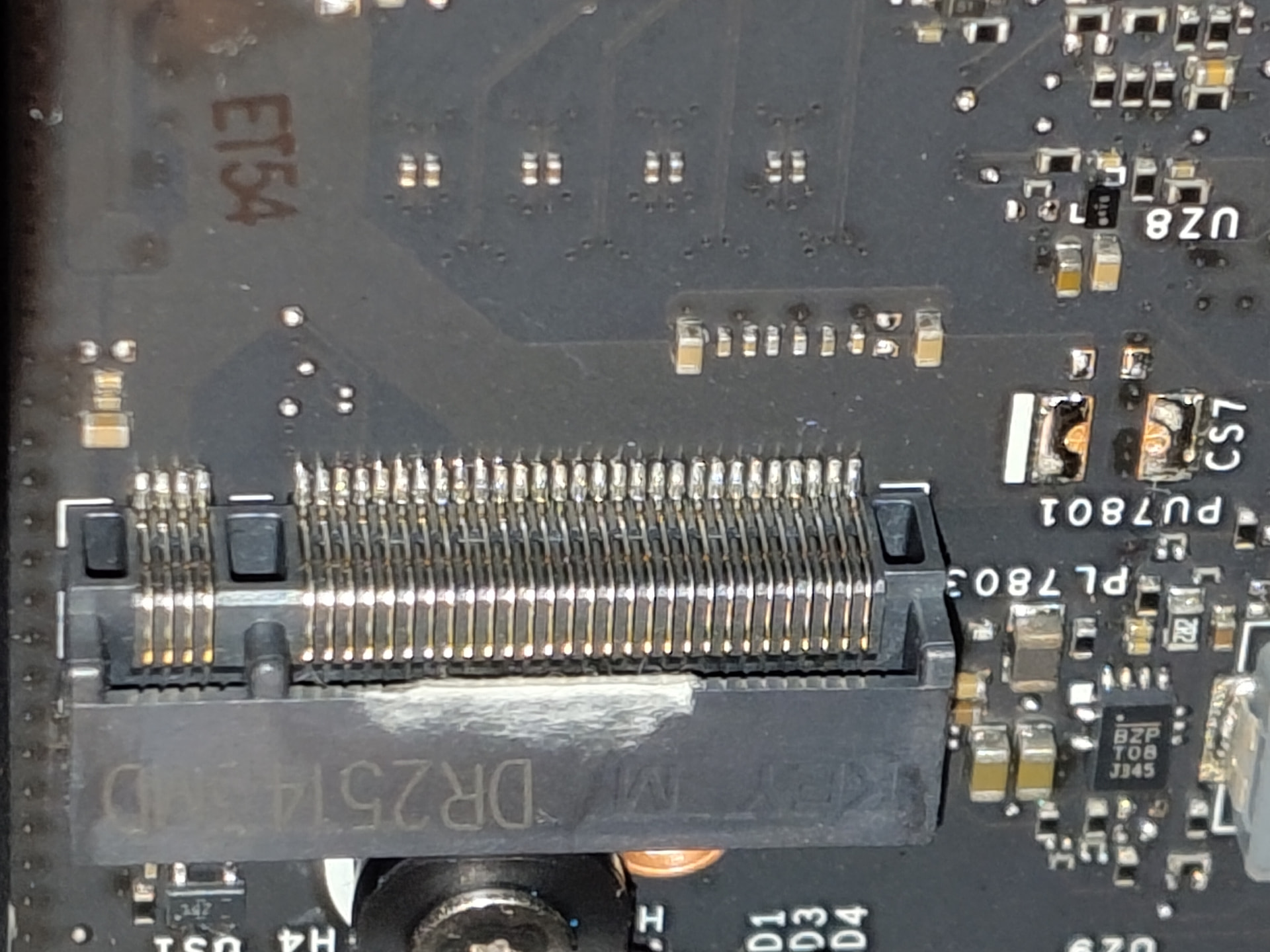
It was my plan to as you say reseat the SSD / reset today. But after I removed my SSD I started to look at m.2 slot, at this discoloration on the main m.2 slot. I have seen it before, but didn’t think much of it, as with the naked eye the slot looked okay to me. But now with my phone, and zoomed in, it looks like some tape over that looks to me like some thermal past in the connector.
Here the photo’s:
Anyway, I’m going to open up a support ticket at this point. As it looks like Quality Control issue to me. There is also some thermal past on DisplayPort shield, I think someone had a bit of trouble with installing the cooler, and put his or her finger with past on the m.2 slot. They try to fix it by removing the past, putting some tape over it, for the past that is in the pinhole’s, but some of that tape is in slot I think blocking some pins.
I’m a bit disappointed with frameworks now.
PS, secondary m.2 slot looks good to me, but I will wait for support now to see what I need to do.
I believe framework uses PTM which isn’t conductive and shouldn’t cause a problem, also it doesn’t look like it is on the pins either, just the plastic housing for the connector. But reaching out to support is probably the best solution as it probably is a defective SSD or mainboard.
I know, it is none conductive, I also can’t confirm my interpretation a 100% it just looks like that to me. But to me looks like some of that tape, if it is tape, is going into the slot blocking maybe some of the front data pins.
Support already got back to me, while I was sleeping. They need some more pictures and some extra clarification. I will try to respond with that this weekend.
Just update for the community/documentation. It’s faulty m.2 slot. Yesterday I order a SSD Docking Station to test my SSD, and it’s working just fine. So no DOA with my SSD.
I answered support with all they asked for. It’s not tape, but defect, they as in the factory, try to fix, I think. But how that got through quality control is beyond me  , as this a batch 17 motherboard.
Here, some more photos of my build & primary m.2 slot:
**There is color swift with some pictures depending on the angle & lighting condition of the defect on the primary m.2 slot.
I also put SSD back in, so I can make a picture of the bios boot manager without SSD showing up, as support needed for documentation. But with so many front pins blocked, it’ll not work.
Thus far, this update. I can guess what’s next, when support gets back to me. 
1 Like
Wow, I’ve never seen an m.2 slot messed up like that. It is impossible to tell that it was blocking pins unless you look at the correct angle. Is that discoloration fused into the plastic on top or is it something that got into the slot either doing or after assembly?
Its fused like it’s melted and pushed down. As you said you can only see it from the right angle, plus you need phone camera to zoom in to see what is going on. That’s why I didn’t think much of it while I put it in my case. It just look like small white scratch on the outside of m.2 slot.
It’s look like they as a factory worker tried to remove something from top of the m.2 slot when they where assembling the motherboard. Instead of putting clean m.2 slot on it. Do they even test m.2 ports?
Anyway we can speculate on the how, I’m more surprised it passed quality control myself.
Odd, I was under the impression framework tested every board before shipping. Well a visual inspection by a human might have missed it, we make mistakes after all, or they might have dismissed it as just a visual blemish in the plastic and still functional.
The only thing that could have possibly happened was the board failed QC for something else and a part on the board had to be replaced and somehow the soldering iron hit this connector and damaged it. Either way hopefully supports gets you a replacement board ASAP.
1 Like
Support already got back to me, on Sunday for me, but for the US it was still Saturday.
After a thorough review of this issue and of the submitted photos/videos, we’ve concluded that there is a need to replace the mainboard.
They also asked some address info to verify, and I ask them how there replace/return procedure’s works.
When they get back to me, I’ll start removing my current motherboard. All in all they are pretty fast, and working in the weekend too.