If you’re on Windows 11 and have installed the infamous 24H2 update, has SSD failure caused any instability so far on your FW system?
No issues to report for SSD failure.
FW16 Ryzen9 7940HS, 64GB Kingston Fury DDR5 5600, Samsung 9100 Pro 4TB SSD.
1 Like
I had two bluescreens on my custom built system of three years for the first time as of recent. Uninstalled a recent update and haven’t had any crashes since.
Still not taking any chances and began to back up my data.
1 Like
I haven’t heard about those before. Here’s the news article. It says:
reportedly affected users have encountered this issue on systems with SanDisk Extreme Pro, Corsair Force MP600, Maxio SSD, KIOXIA EXCERIA PLUS G4, KIOXIA M.2 SSD, and other drives with Phison PS5012-E12 and InnoGrit controllers.
So seems like Samsung SSD households (like mine) are safe from this one.
1 Like
WD Black SN750 NVMe and I have crashes too. Windows 11 24H2 on a Framework 13 12th Gen Intel(R) Core™ i7-1260P, Rev. 39427
Only happened when Windows updated last month from 23
2 Likes
Yes. Happened the day before the reports started making the rounds through the tech news. Received the Windows update in question. Was later installing a several GB app on one of the affected drives (sk hynix P41). Install paused then failed to install. Restarted. Met with a “No bootable device” boot failure. The sk hynix had phased out of existence. Rebooted. Everything came back. (Re-installed the app with success this time.)
I have that model NVMe installed in a couple of FW16s plus several other AMD & Intel systems. None of the others have exhibited the problem.
And the drive is definitely not using pre-release/engineering firmware, unless that somehow has leaked into retail supply chains.
2 Likes
Ibohn
I found a thread on Reddit. Through that thread I found they were talking about my particular SSD. Before all this I was playing in BIOS, disabling this, enabling that. Trying to figure out what was going on. I downloaded the SanDisk Dashboard, v 5.02.3 and have run that. Will see.
What generally happens is when I boot it takes me into recovery. Sometimes it continues to booting up, sometimes if I hit enter it continues, sometimes I have to hold down the power key until it shuts down. Rinse and repeat. I did read about the pre-release stuff, but I am not techie, just another end user looking for an answer.
Today, the sequence is Recovery screen, hit enter and it boots up normally. Is this problem solely 24H2 or is it something wrong at Framework?
I am not sure if it’s SSD related but I have the same windows version and no issues. I have windows installed on a Samsung 9100 Pro SSD. The Samsung Magician software shows the SSD healthy and no bad sectors and performing optimally.
2 Likes
It’s only some Ssds, but the culprit is the windows update.
1 Like
The culprit is the manufacturer shipping bad firmware in your drive, it seems:
1 Like
Microsoft and its allies are shifting the blame. If the firmware, pre-release or not, is problematic, why everything was okay before this infamous Windows update? Think about (scientific) control variable(s), the SSD is the constant while Windows version is the variable.
3 Likes
So the reason why I am not seeing this issue is because Samsung uses its own proprietary controller for its SSDs? My FW16 has a 9100 Pro and my wife’s Fujitsu has a 990 Pro both Samsung drivers and both machines running Win11 24H2.
1 Like
So is the Phison firmware used on WD SSD from Framework?
I did some more research incase it helps others. But for my Samsung drives this is what I found out. Can’t speak for other drive manufacturers as I don’t have any other than Samsung.
- 990 Pro SSDs use proprietary “Pascal” controller
- 9100 Pro SSDs use proprietary “Presto” controller
Easier to read chart of the affected drives in the initial reporting.
Green are unaffected.
Orange will fail but recover after a reboot.
Red are unrecoverable.
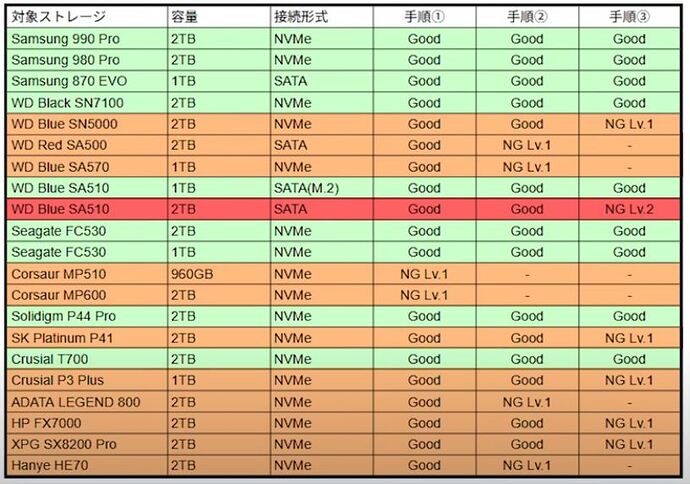
[source]
2 Likes
OH yeah. Looks like my WD.
So Framework support, how about weighing in on this topic? Is there a controller problem with WD SSDs that Framework sells and puts in its laptops? Or is this a Windows 11 24H2 problem? Anything? Tks.
Not from Framework….but relevant:
3 Likes
Worked with support, many different apps to discover what is happening. Allowed new bios to do optimum settings, ran Samsung Dashboard and allowed it to make changes to Trim. All seems to have helped, if not eliminated crashes. Now the standard, but irregular failure to boot up is followed by a successful one. The error message I am getting now is: “Your device ran into problem and needs to restart”
The screen flickers before this error message and afterwards the laptop reboots OK.
Was able to make out a message at the bottom of the screen that said: Thread Exception Not Handled. No idea what that means?
No idea of what is happening except to note that none of this happened before updating to 24H2 and before SSD failures explained here by the screenshot.
Still have not heard what controller Framework uses with its WD SSDs.
N