That doesn’t sound great, I wonder if the nerfed the cooling on the pro in favor of being quieter.
It might be because of that, or maybe with 18A node Intel is now having localized heat dissipation issues just like AMD had in the past. I see temps quickly rising to 90+ degrees with single core load and I don’t think ramping up fans can catch up with that sharp spike.
TBH I think the tiny heatsink & single fan is not going to help much anyways.
Another thing I noticed is that the PPD profiles under Linux mostly concern CPU and not GPU. Since the power budget is shared, I figured for some games it’s better to play on power saver/balanced than on performance. For example in POE 2, performance profile have worse frame time & less fps than on balanced.
OTOH in CPU-intensive games performance mode is basically required, for example starcraft 2.
Wierdly, for POE 2, balanced shows less frame time & more fps than power saver but feels stutter-y compared to power saver.
@David_Benepe does that only happen in the BIOS? Does the OS correctly show the battery percentage?
I’m keeping an eye on this Framework 358H score list. Nothing over 15000 yet.
https://browser.geekbench.com/v6/cpu/search?q=framework+358h&sort=multicore_score
Dell’s XPS 14 358H seem to be around 16000-18000.
https://browser.geekbench.com/v6/cpu/search?page=1&q=xps+14+358h&sort=multicore_score
For a short bursty test like geekbench I don’t think fan speed matters.
Maybe the lower ram speed is hindering fw13, or the XPS have a much larger & more conductive heatsink allowing the chip to boost for longer without throttling, that’s my guess
The localized hotspot thing would explain why it has low power under burst loads but not a steady state multithreaded load, a hotspot on one core would just have that back off and another one being able to use that power.
How much sustained power can you draw using the gpu?
Does ectool work on the pro board to max out the fans?
Can we please move the benchmark/performance discussion to a new topic?
As interesting as it is to follow, I’m patiently and excitedly waiting for people to start shouting it’s Shipping! As my notifications on this topic haha
2 Likes
from testing in windows 11, 35W is the sustained limit for CPU & GPU combined. Short term limit is 60W. I think XPS 14 have like 40W sustained limit.
On Linux there is s-tui reporting package power which rarely touches 35W and the Psys which is so high (frequently >60W) it doesn’t make sense.
Don’t know what is ectool, I just used framework_tool to max the fans and did a rerun: https://browser.geekbench.com/v6/cpu/18533516
Higher ST, still can’t break 15K MT.
I really don’t think the difference in sustained power limit matters in GB6 - I was watching the hwinfo power draw as it run, and there’s maybe 1 or 2 test items in MT that hits >35W for maybe 2 seconds. I would blame memory speed.
for reference my FW13 HX 370 got 16220 points
https://browser.geekbench.com/v6/cpu/12673181
1 Like
No. The OS reports that no battery is connected when using the new board, so I can’t see the percentage. If I hook up my old intel 1240p mainboard the battery percentage shows up just fine.

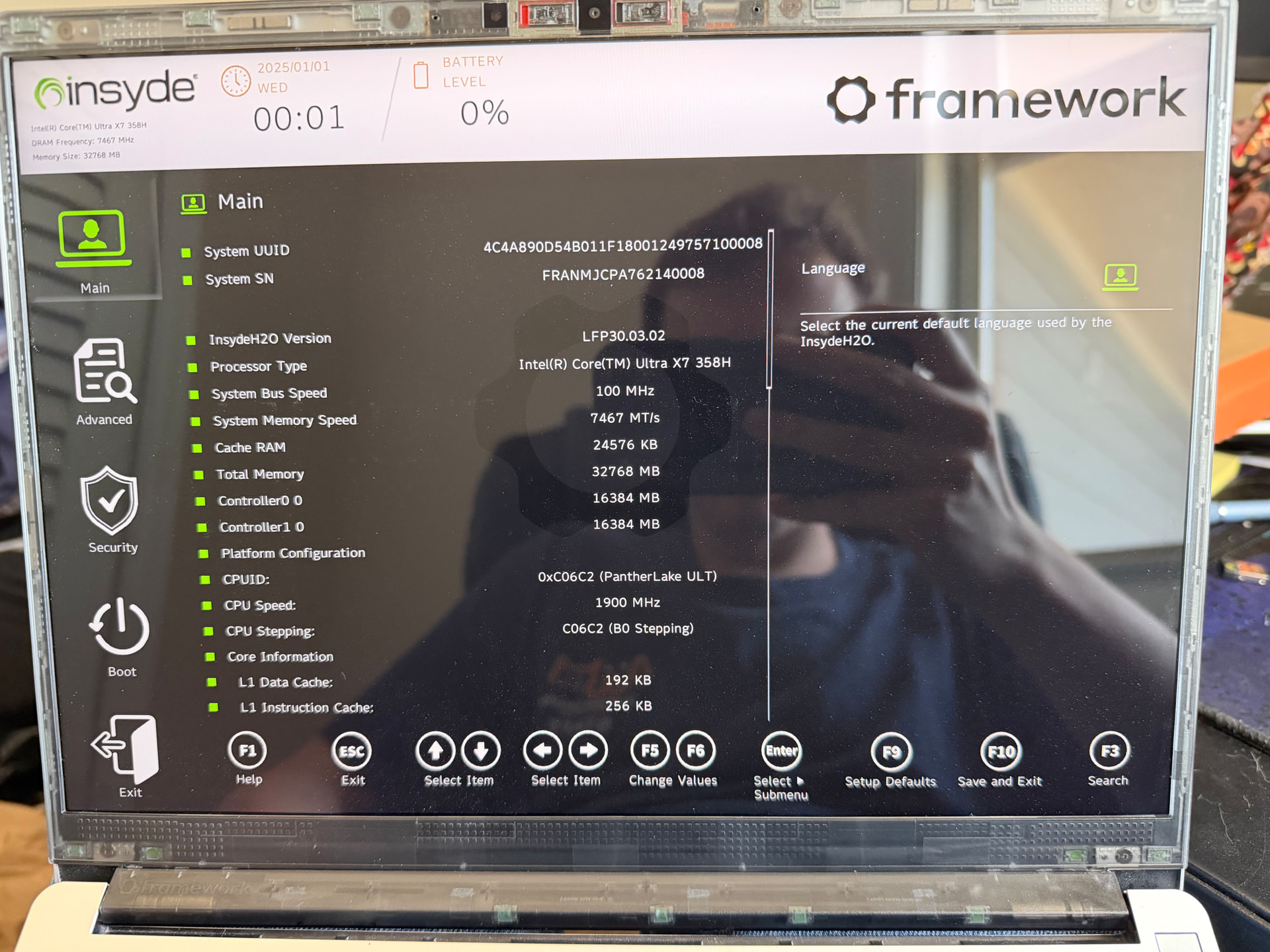
Yep, on version 3.02.
Ignore the date up top being incorrect. I took apart the laptop to double check for bent-pins on the battery connector (it still looks fine).
Edit:
Oh, the battery finally died and I just realized that I might not be able to charge the battery using this mainboard. At this point I have to keep it plugged into the wall or it instantly shuts off. That is a much bigger concern for me. 
It might be worth starting a support ticket if you haven’t already. It sounds like it could be a hardware issue with the board.
I made a post on the forum, hoping that we can all keep the excitement alive before the 13 Pro hits our doorsteps
Still waiting on my notification here… and trying not to look too closely at the laptops with AMD Ryzen AI Max+ 395 chips, 64GB RAM, 1TB SSD with immediate availability for only slightly more than my pre-order Intel Ultra X7 385H with 32GB but no storage.
| FYI just received this email. |
Updates on Framework Laptop 13 Pro shipments
We have a few quick updates for you on how we are tracking on Framework Laptop 13 Pro shipments. We completed validation of the Haptic Touchpad, started manufacturing, and are on track to start Batch 1 shipments at the end of July. To ensure they can meet our performance and quality standards, our touchpad supplier is ramping up production output more slowly than we had originally planned for. The late start and the slower manufacturing ramp is resulting in additional delays for Batches 6 through 13 over what we previously communicated. We have the latest shipment dates in the table below. We’re working with our suppliers daily to try to pull in this schedule, but we want to make sure you have visibility of the known delay in the meantime. If the new shipment timing no longer works for you, your pre-order deposit is fully refundable. We will continue to keep you up to date on the schedule as we continue production ramp.

Since our last email, we have started shipping out both Mainboard and Display pre-orders, and the initial feedback from community members is excellent. As part of our production qualification, we also built a quantity of Framework Laptop 13 Pro press units that we will begin shipping out to reviewers next week. You’ll see reviews go live towards the end of this month.
For more detail around the Haptic Touchpad production delay, there are two driving factors. The first is three layers deep in our supply chain. The root cause of the Haptic Touchpad delay was an electrical design issue that drove us to need to re-spin the Touchpad PCB, which made that PCB the gating material for production. The PCB supplier delayed the delivery schedule for production output beyond their first delivery, which delayed assembly of modules at our Haptic Touchpad supplier, which delayed assembly of Input Covers and Systems at our final assembly supplier. The first delivery of PCBs covers our first few pre-order batches, while the additional deliveries drive part of the delay in the further batches. The second driving factor is on test fixtures at our Haptic Touchpad supplier. To meet our quality and performance requirements, the testing time required per unit is driving production output around half of what we had originally planned. We’ve worked with the supplier to order additional test fixtures which come online late this month, which will gradually increase output along our production ramp.
We apologize again for the delay on Framework Laptop 13 Pro. We want to ensure this product meets the level of quality, performance, and reliability that you expect from it. We’ll continue to keep you updated as we begin shipments, and we appreciate your continued support and patience.
Edit: fixed table
1 Like
The guides are available 
here is the DYI: Framework Laptop 13 Pro DIY Edition Quick Start Guide - Framework Guides
As time goes by I find myself checking my order status more and more frequently. Anyone else have an unhealthy level of excitement and/or impatience? haha Can’t wait!
2 Likes